Customizing data output
When using pydov to search datasets, the returned dataframe has different default columns (fields) depending on the dataset. We believe each dataframe to contain the most relevant fields for the corresponding dataset, but pydov allows you to select and customize the fields you want to be returned in the output dataframe.
Using return fields
Next to the query and location parameters, you can use the return_fields parameter of the search method to limit the columns in the dataframe and/or specify extra columns not included by default. The return_fields parameter takes a list of field names, which can be any combination of the available fields for the dataset you’re searching.
For example, to query the boreholes in Ghent but only retrieve their depth, you’d use:
from pydov.search.boring import BoringSearch

bs = BoringSearch()
df = bs.search(
    query=PropertyIsEqualTo('gemeente', 'Gent'),
    return_fields=('pkey_boring', 'diepte_boring_tot')
)
Note that you can not only use return_fields to limit the columns from the default dataframe, but you can also add extra fields not included in this default set. The following example returns the purpose (‘doel’) of all the Ghent boreholes:
from pydov.search.boring import BoringSearch

bs = BoringSearch()
df = bs.search(
  query=PropertyIsEqualTo('gemeente', 'Gent'),
  return_fields=('pkey_boring', 'doel')
)
You can get an overview of the available fields for a dataset using its search objects get_fields method. More information can be found in the Available attribute fields section.
Note
Significant performance gains can be achieved by only including the fields you need, and more specifically by including only fields with a cost of 1. More information can be found in the Performance section below.
For instance, in the examples above only fields with a cost of 1 are selected, allowing the results to be retrieved almost instantly. By selecting only fields available in the WFS service (i.e. fields with a cost of 1), pydov only needs to query the WFS service to obtain the results and doesn’t need to download any additional XML documents.
Including geometries
By default, pydov will only include attribute fields in the output dataframe. However it is possible to add the geometry too, when requested in the return_fields parameter and additional support for geometries has been installed (see Installation).
- Finding geometry columns
When pydov is installed with additional support for geometries, geometry column(s) are listed in the output of the
get_fields()method. You can recognise them from their ‘type’, which is ‘geometry’:from pydov.search.boring import BoringSearch bs = BoringSearch() print(bs.get_fields(type='geometry')) {'geom': {'name': 'geom', 'definition': None, 'type': 'geometry', 'multivalue': False, 'notnull': False, 'query': False, 'cost': 1}}
- Adding geometry return fields
To add geometry columns as return field, you can add an instance of
pydov.search.fields.GeometryReturnFieldspecifying both the geometry field name and the desired CRS:df = bs.search( return_fields=['pkey_boring', GeometryReturnField('geom', epsg=31370)], max_features=1 ) print(df) pkey_boring geom 0 https://www.dov.vlaanderen.be/data/boring/2016... POINT (92424 170752)
- Turning the result into a GeoPandas GeoDataFrame
pydov result dataframes which include a geometry column can easily be transformed from a normal Pandas DataFrame into a GeoPandas GeoDataFrame for further (geo) analysis, exporting or use in a new query using a
pydov.util.location.GeopandasFilter:bs = BoringSearch() df = bs.search( return_fields=['pkey_boring', GeometryReturnField('geom', 4326)], max_features=1 ) geo_df = GeoDataFrame(df, geometry='geom', crs='EPSG:4326') geo_df.to_file('boringen.geojson')
Customizing object types and subtypes
Next to the default objecttypes in pydov, that are used when creating a search object for the given type, some object types support extra (main) fieldsets, extra subtypes or both. It is also possible to fully customize a datatype by defining your own fields for a main type, or your own subtypes.
Adding extra fields
To list the available extra fieldsets of a type, you can use the get_fieldsets method. The result is a dictionary with for each of the fieldsets a new dictionary with more information:
from pydov.types.boring import Boring

fieldsets = Boring.get_fieldsets()
for f in fieldsets.values():
    print(f)

    # {
    #    'name': 'MethodeXyz',
    #    'class': <class 'pydov.types.boring.MethodeXyz'>,
    #    'definition': 'Fieldset containing fields for method and reliability of the [...]'
    # }
For each fieldset, the following information is available:
- name
The name of the fieldset.
Example:
'MethodeXyz'- class
The class where the fields of this fieldset are defined. This is also the class to import and use to add the extra fields to the main type.
Example:
<class 'pydov.types.boring.MethodeXyz'>- definition
A description of the fieldset and how it could be used. It always includes a list of field names. To get a full definition of the fields themselves, create a search instance with the extra fields and use the
get_fieldsmethod.Example:
'Fieldset containing fields for method and reliability of the [...]'
To add the extra fieldset to the object type, you can use the with_extra_fields method. This can be done while instantiating a search class:
from pydov.search.boring import BoringSearch
from pydov.types.boring import Boring, MethodeXyz

borehole_search = BoringSearch(
    objecttype=Boring.with_extra_fields(MethodeXyz)
)
# df = borehole_search.search(...)
The extra fields will now be part of your object type, and will hence be available in the get_fields output as well as in the output dataframe.
Adding or switching subtypes
To list the available subtypes of a type, you can use the get_subtypes method. The result is a dictionary with for each of the subtypes a new dictionary with more information:
from pydov.types.boring import Boring

subtypes = Boring.get_subtypes()
for st in subtypes.values():
    print(st)

    # {
    #    'name': 'Kleur',
    #    'class': <class 'pydov.types.boring.Kleur'>,
    #    'definition': 'Subtype listing the color values of the borehole. [...]'
    # }
For each subtype, the following information is available:
- name
The name of the subtype.
Example:
'Kleur'- class
The class where the fields of this subtype are defined. This is also the class to import and use to add the subtype to the main type.
Example:
<class 'pydov.types.boring.Kleur'>- definition
A description of the subtype and how it could be used. It always includes a list of field names. To get a full definition of the fields themselves, create a search instance with the extra fields and use the
get_fieldsmethod.Example:
'Subtype listing the color values of the borehole. [...]'
To use the subtype, you can use the with_subtype method of the main type. This can be done while instantiating a search class:
from pydov.search.boring import BoringSearch
from pydov.types.boring import Boring, Kleur

borehole_search = BoringSearch(
    objecttype=Boring.with_subtype(Kleur)
)
# df = borehole_search.search(...)
The extra fields from the subtype will now be part of your object type, and will hence be available in the get_fields output as well as in the output dataframe.
Defining custom object types
Should you want to make the returned dataframe fields more permanent or, more importantly, add extra XML fields to an existing object type, you can define your own object types and subtypes.
pydov works internally with search classes (in pydov.search) and object types and subtypes (in pydov.types). The former are derived from pydov.search.abstract.AbstractSearch and define the WFS services to be queried while the latter define which fields to retrieve from the WFS and XML services for inclusion in the resulting dataframe.
An object main type (derived from pydov.types.abstract.AbstractDovType, f.ex. GrondwaterFilter) can contain fields from both the WFS service as well as from the XML document, noting that there will be a single instance of the main type per WFS record. On the contrary, an object subtype (derived from pydov.types.abstract.AbstractDovSubType, f.ex. Peilmeting) can list only fields from the XML document and can have a many-to-one relation with the main type: i.e. there can be multiple instances of the subtype for a given instance of the main type (f.ex. a single GrondwaterFilter can have multiple Peilmetingen). In the resulting output both will be combined in a single, flattened, dataframe whereby there will be as many rows as instances from the subtype, repeating the values of the main type for each one.
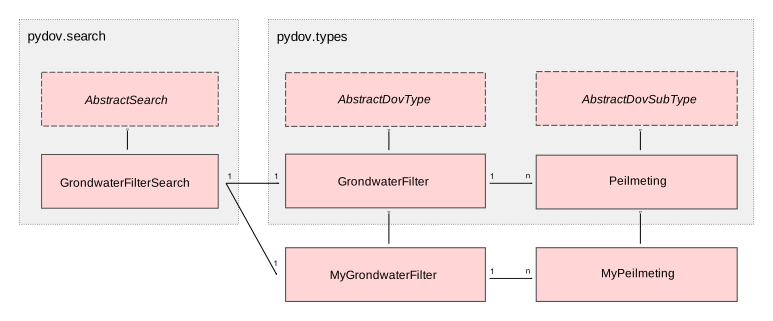
UML schema of search classes, object types and subtypes
Search classes and object types are loosely coupled, each search class being linked to the default object type of the corresponding DOV object, allowing users to retrieve the default dataframe output when performing a search. However, to enable advanced customization of dataframe output columns at runtime, pydov allows for specifying an alternative object type upon creating an instance of the search classes. This system of ‘pluggable types’ enables users to extend the default type or subtype fields, or in fact rewrite them completely for their use-case.
The three most common reasons to define custom types are listed below: adding an extra XML field to a main type, a subtype or defining a new custom subtype altogether.
Adding an XML field to a main type
To add an extra XML field to an existing main type, you can use its with_extra_fields method. It takes a new list as its argument, containing the fields to be added. These should all be instances of pydov.types.fields.XmlField. While it is possible to add instances of pydov.types.fields.WfsField as well, this is generally not necessary as those can be used in the return_fields argument without being explicitly defined in the object type.
For example, to add the field ‘methode_xy’ to the Boring datatype, you’d write:
from pydov.search.boring import BoringSearch
from pydov.types.boring import Boring
from pydov.types.fields import XmlField

MyBoring = Boring.with_extra_fields([
    XmlField(name='methode_xy',
             source_xpath='/boring/ligging/metadata_locatiebepaling/methode',
             datatype='string')
])

bs = BoringSearch(objecttype=MyBoring)
df = bs.search(max_features=10)
Adding an XML field to a subtype
To add an extra XML field to an existing subtype you can use its with_extra_fields method. It takes a new list as its argument, containing the fields to be added. These should all be instances of pydov.types.fields.XmlField. The source_xpath will be interpreted relative to the base subtypes rootpath.
To register your new subtype in a custom main type, use its with_subtype method using your new subtype.
For example, to add the field ‘opmeter’ to the Peilmeting subtype, you’d write:
from pydov.search.grondwaterfilter import GrondwaterFilterSearch
from pydov.types.grondwaterfilter import GrondwaterFilter, Peilmeting
from pydov.types.fields import XmlField

MyPeilmeting = Peilmeting.with_extra_fields([
    XmlField(name='opmeter',
             source_xpath='/opmeter/naam',
             datatype='string')
])

fs = GrondwaterFilterSearch(
  objecttype=GrondwaterFilter.with_subtype(MyPeilmeting)
)
df = fs.search(max_features=10)
Adding a new subtype to a main type
To add a new subtype to an existing main type or, perhaps more likely, to replace the existing subtype of a main type, you have to specify the subtype and all of its fields. To register your new subtype in a custom main type, use its with_subtype method using your new subtype.
Your new subtype should be a direct subclass of pydov.types.abstract.AbstractDovSubType and should implement both the rootpath as well as the fields variables. The rootpath is the XPath expression of the root instances of this subtype in the XML document and should always start with .//. There will be one instance of this subtype (and, consequently, one row in the output dataframe) for each element matched by this XPath expression.
The fields should contain all the fields (or: columns in the output dataframe) of this new subtype. These should all be instances of pydov.types.fields.XmlField. The source_xpath will be interpreted relative to the subtypes rootpath.
Suppose you are not interested in the actual measurements from the CPT data but are instead interested in the different techniques applied while measuring. To get a dataframe with the different techniques per CPT location, you’d create a new subtype and register it in your own CPT type:
from pydov.search.sondering import SonderingSearch
from pydov.types.abstract import AbstractDovSubType
from pydov.types.sondering import Sondering
from pydov.types.fields import XmlField

class Technieken(AbstractDovSubType):

    rootpath = './/sondering/sondeonderzoek/penetratietest/technieken'

    fields = [
        XmlField(name='techniek_diepte',
                 source_xpath='/diepte_techniek',
                 datatype='float'),
        XmlField(name='techniek',
                 source_xpath='/techniek',
                 datatype='string'),
        XmlField(name='techniek_andere',
                 source_xpath='/techniek_andere',
                 datatype='string')
    ]

MySondering = Sondering.with_subtype(Technieken)

ms = SonderingSearch(objecttype=MySondering)
df = ms.search(max_features=10)