Example of DOV search methods for boreholes (boringen)

Use cases explained below
Get boreholes in a bounding box
Get boreholes with specific properties
Get boreholes in a bounding box based on specific properties
Select boreholes in a municipality and return depth
Get boreholes based on fields not available in the standard output dataframe
Get borehole data, returning fields not available in the standard output dataframe
Get boreholes in a municipality and where groundwater related data are available
Adding location and height details
Adding color to the Borehole dataframe
[1]:
%matplotlib inline
import inspect, sys
import warnings; warnings.simplefilter('ignore')
[2]:
# check pydov path
import pydov
Get information about the datatype ‘Boring’
[3]:
from pydov.search.boring import BoringSearch
boring = BoringSearch()
A description is provided for the ‘Boring’ datatype:
[4]:
boring.get_description()
[4]:
'In de DOV-databank is elke waarneming van grondlagen een boring. Bij de meeste boringen wordt er met een boortoestel een gat gemaakt in de ondergrond om de verschillende grondlagen te kunnen beschrijven. Aan de hand van een boring krijg je een beeld van het materiaal in de ondergrond met toenemende diepte. Afhankelijk van het doel waarvoor de boring geplaatst wordt, zal men een geschikte boormethode toepassen. Boringen worden geplaatst voor verkennend bodemonderzoek, monstername van het sediment en/of grondwater, bepaling van bodemfysische parameters, milieuhygiënisch onderzoek,… Afhankelijk van de diepte, soort materiaal, en het al dan niet boren tot onder de grondwatertafel kan men kiezen uit verscheidene systemen voor handmatig of machinaal te boren. Het bodemmateriaal dat vrijkomt, kan gebruikt worden om een profiel van de ondergrond op te stellen of om er grondmonsters van te nemen om verdere analyses op uit te voeren. Vaak is het de bedoeling een put uit te bouwen zodat water kan gewonnen worden (zie ook grondwatermeetnet en grondwatervergunningen). Soms worden boringen uitgevoerd om een aantal geotechnische karakteristieken te bepalen of om wetenschappelijk onderzoek uit te voeren. Oppervlakkige waarnemingen van de ondergrond noemen we ook boringen. Vooral rond 1900 beschreven een aantal geologen vaak de oppervlakkige lagen. In de databank staan er dan ook verschillende boringen met een diepte van 0 meter. Het gaat vooral om weginsnijdingen of om zichtbare lithologische kenmerken langs de oppervlakte.'
The different fields that are available for objects of the ‘Boring’ datatype can be requested with the get_fields() method:
[5]:
fields = boring.get_fields()

# print available fields
for f in fields.values():
    print(f['name'])
id
boornummer
pkey_boring
rapport
diepte_boring_tot
datum_aanvang
namen
putnummer
x
y
start_boring_mtaw
gemeente
uitvoerder
doel
methode
erkenning
opdrachtgever
informele_stratigrafie
formele_stratigrafie
lithologische_beschrijving
gecodeerde_lithologie
hydrogeologische_stratigrafie
quartaire_stratigrafie
geotechnische_codering
informele_hydrostratigrafie
doorheen_quartair
dikte_quartair
tertiair_onder_quartair
opdrachten
eerste_invoer
geom
diepte_boring_van
boorgatmeting
diepte_methode_van
diepte_methode_tot
boormethode
mv_mtaw
Alternatively, you can list all the fields and their details by inspecting the get_fields() output or the search instance itself in a notebook:
[6]:
boring
[6]:
In de DOV-databank is elke waarneming van grondlagen een boring. Bij de meeste boringen wordt er met een boortoestel een gat gemaakt in de ondergrond om de verschillende grondlagen te kunnen beschrijven. Aan de hand van een boring krijg je een beeld van het materiaal in de ondergrond met toenemende diepte. Afhankelijk van het doel waarvoor de boring geplaatst wordt, zal men een geschikte boormethode toepassen. Boringen worden geplaatst voor verkennend bodemonderzoek, monstername van het sediment en/of grondwater, bepaling van bodemfysische parameters, milieuhygiënisch onderzoek,… Afhankelijk van de diepte, soort materiaal, en het al dan niet boren tot onder de grondwatertafel kan men kiezen uit verscheidene systemen voor handmatig of machinaal te boren. Het bodemmateriaal dat vrijkomt, kan gebruikt worden om een profiel van de ondergrond op te stellen of om er grondmonsters van te nemen om verdere analyses op uit te voeren. Vaak is het de bedoeling een put uit te bouwen zodat water kan gewonnen worden (zie ook grondwatermeetnet en grondwatervergunningen). Soms worden boringen uitgevoerd om een aantal geotechnische karakteristieken te bepalen of om wetenschappelijk onderzoek uit te voeren. Oppervlakkige waarnemingen van de ondergrond noemen we ook boringen. Vooral rond 1900 beschreven een aantal geologen vaak de oppervlakkige lagen. In de databank staan er dan ook verschillende boringen met een diepte van 0 meter. Het gaat vooral om weginsnijdingen of om zichtbare lithologische kenmerken langs de oppervlakte.
id - Volgnummer ter identificatie (intern en niet-stabiel).
- type: string
- notnull: True
- query: True
- cost: 1
- multivalue: False
boornummer - Het boornummer (ook gekend als proefnummer) van de boring.
- type: string
- notnull: True
- query: True
- cost: 1
- multivalue: False
pkey_boring - Permanente URL die verwijst naar de gegevens van de boring op de website. Voeg '.xml' toe om een XML voorstelling van deze gegevens te verkrijgen.
- type: string
- notnull: True
- query: True
- cost: 1
- multivalue: False
rapport - URL die verwijst naar het rapport van de boring in PDF formaat.
- type: string
- notnull: True
- query: True
- cost: 1
- multivalue: False
diepte_boring_tot - Maximumdiepte van de boring ten opzichte van het aanvangspeil, in meter.
- type: float
- notnull: False
- query: True
- cost: 1
- multivalue: False
datum_aanvang - Datum waarop men de boring gestart is.
- type: date
- notnull: False
- query: True
- cost: 1
- multivalue: False
namen - Alternatieve benamingen voor de boring.
- type: string
- notnull: False
- query: True
- cost: 1
- multivalue: False
putnummer - Het GW_ID (ook gekend als putnummer) van de put waaraan de boring gekoppeld is. Wanneer dit veld leeg is is de boring niet gekoppeld aan een put.
- type: string
- notnull: False
- query: True
- cost: 1
- multivalue: False
x - De x-coördinaat van de boring in het Lambert72 coördinaatsysteem (in meter, EPSG:31370).
- type: float
- notnull: True
- query: True
- cost: 1
- multivalue: False
y - De y-coördinaat van de boring in het Lambert72 coördinaatsysteem (in meter, EPSG:31370).
- type: float
- notnull: True
- query: True
- cost: 1
- multivalue: False
start_boring_mtaw - De hoogte van het aanvangspeil van de boring in het TAW stelsel (in meter).
- type: float
- notnull: True
- query: True
- cost: 1
- multivalue: False
gemeente - De gemeente waarin de boring gelegen is.
- type: string
- notnull: False
- query: True
- cost: 1
- multivalue: False
uitvoerder - De organisatie die de boring uitvoerde. Heeft als waarde 'onbekend' indien de uitvoerder niet gekend is.
- type: string
- notnull: False
- query: True
- cost: 1
- multivalue: False
doel - Het doel van de boring.
- type: string
- notnull: False
- query: True
- cost: 1
- multivalue: False
- codelist:
Berging - Berging
Drainage en bemaling - Drainage en bemaling
Exploratie energie bronnen - Exploratie energie bronnen
Exploratie minerale bronnen - Exploratie minerale bronnen
Exploratie ondergrondse opslag - Exploratie ondergrondse opslag
Geochemisch onderzoek - Geochemisch onderzoek
Geofysisch onderzoek - Geofysisch onderzoek
Geologisch onderzoek - Geologisch onderzoek
Geotechnisch onderzoek - Geotechnisch onderzoek
Geothermie - Geothermie
Grondwaterkwaliteit monitoring - Grondwaterkwaliteit monitoring
Grondwaterkwantiteit monitoring - Grondwaterkwantiteit monitoring
Grondwatermonitoring - Grondwatermonitoring
Grondwaterwinning - Grondwaterwinning
Hydrogeologisch onderzoek - Hydrogeologisch onderzoek
Infiltratie - Infiltratie
Kathodische bescherming - Kathodische bescherming
Monitoring vervuilde sites - Monitoring vervuilde sites
Sanering - Sanering
methode - De methode waarmee de boring uitgevoerd werd. Heeft als waarde 'onbekend' indien de methode niet gekend is.
- type: string
- notnull: True
- query: True
- cost: 1
- multivalue: False
- codelist:
Meerdere technieken - Meerdere technieken
avegaarboring - avegaarboring
droge boring - droge boring
edelmanboring - edelmanboring
geen boring - geen boring
gestoken boring - gestoken boring
graafmachine - graafmachine
handboring - handboring
kernboring - kernboring
lansen - lansen
lepelboring - lepelboring
luchthamer - luchthamer
luchthevelboren of air-lift boren - luchthevelboren of air-lift boren
meerdere technieken - meerdere technieken
omgek. spoelboring - omgek. spoelboring
onbekend - onbekend
pulsboring - pulsboring
ramkernboring - ramkernboring
rollerbit - rollerbit
slagboring - slagboring
spade - spade
spiraalboring - spiraalboring
spoelboring - spoelboring
steenboring - steenboring
trilboring - trilboring
zuigboring - zuigboring
erkenning - In het kader van welke discipline de boring werd uitgevoerd. Deze codelijst bevat de verschillende disciplines van erkende boorbedrijven uit artikel 6, 7°, a) van VLAREL.
- type: string
- notnull: False
- query: True
- cost: 1
- multivalue: False
- codelist:
1. Bemalingen en draineringen - 1. Bemalingen en draineringen
2. Andere grondwaterwinningen - 2. Andere grondwaterwinningen
3. Stabiliteitsboringen en geotechnische boringen - 3. Stabiliteitsboringen en geotechnische boringen
4. Verticale boringen - 4. Verticale boringen
5. Andere boringen - 5. Andere boringen
opdrachtgever - De organisatie die de opdracht gaf om de boring uit te voeren. Heeft als waarde 'onbekend' indien de opdrachtgever niet gekend is.
- type: string
- notnull: True
- query: True
- cost: 1
- multivalue: False
informele_stratigrafie - Geeft aan of er aan de boring minstens één interpretatie van het type 'informele stratigrafie' gekoppeld is.
- type: boolean
- notnull: True
- query: True
- cost: 1
- multivalue: False
formele_stratigrafie - Geeft aan of er aan de boring minstens één interpretatie van het type 'formele stratigrafie' gekoppeld is.
- type: boolean
- notnull: True
- query: True
- cost: 1
- multivalue: False
lithologische_beschrijving - Geeft aan of er aan de boring minstens één interpretatie van het type 'lithologische beschrijving' gekoppeld is.
- type: boolean
- notnull: True
- query: True
- cost: 1
- multivalue: False
gecodeerde_lithologie - Geeft aan of er aan de boring minstens één interpretatie van het type 'gecodeerde lithologie' gekoppeld is.
- type: boolean
- notnull: True
- query: True
- cost: 1
- multivalue: False
hydrogeologische_stratigrafie - Geeft aan of er aan de boring minstens één interpretatie van het type 'hydrogeologische stratigrafie' gekoppeld is.
- type: boolean
- notnull: True
- query: True
- cost: 1
- multivalue: False
quartaire_stratigrafie - Geeft aan of er aan de boring minstens één interpretatie van het type 'quartaire stratigrafie' gekoppeld is.
- type: boolean
- notnull: True
- query: True
- cost: 1
- multivalue: False
geotechnische_codering - Geeft aan of er aan de boring minstens één interpretatie van het type 'geotechnische codering' gekoppeld is.
- type: boolean
- notnull: True
- query: True
- cost: 1
- multivalue: False
informele_hydrostratigrafie - Geeft aan of er aan de boring minstens één interpretatie van het type 'informele hydrostratigrafie' gekoppeld is.
- type: boolean
- notnull: True
- query: True
- cost: 1
- multivalue: False
doorheen_quartair - Geeft aan of de boring dieper ging dan de grens van het Quartair en het Neogeen/Paleogeen (Tertiair). Dit veld is enkel ingevuld indien er minstens één interpretatie van het type 'formele stratigrafie' gekoppeld is aan de boring én het Quartair geïnterpreteerd werd.
- type: boolean
- notnull: False
- query: True
- cost: 1
- multivalue: False
dikte_quartair - Dit veld geeft de dikte weer van het Quartair (in meter). Dit is een getal met twee decimalen, soms voorafgegaan door < of >= (bv. >= 10.00).
- type: string
- notnull: False
- query: True
- cost: 1
- multivalue: False
tertiair_onder_quartair - Indien 'doorheen_quartair' true is bevat dit veld de afkorting van de eerste lithostratigrafische eenheid van het Neogeen/Paleogeen (Tertiair) die voorkomt onder het Quartair.
- type: string
- notnull: False
- query: True
- cost: 1
- multivalue: False
opdrachten - De DOV-opdracht(en) waaraan de boring gekoppeld is.
- type: string
- notnull: False
- query: True
- cost: 1
- multivalue: False
eerste_invoer - Het tijdstip waarop deze boring voor het eerst in DOV ingevoerd werd.
- type: datetime
- notnull: True
- query: True
- cost: 1
- multivalue: False
geom - None
- type: geometry
- notnull: False
- query: False
- cost: 1
- multivalue: False
diepte_boring_van - Startdiepte van de boring (in meter).
- type: float
- notnull: True
- query: False
- cost: 10
- multivalue: False
boorgatmeting - Is er een boorgatmeting uitgevoerd (ja/nee).
- type: boolean
- notnull: False
- query: False
- cost: 10
- multivalue: False
diepte_methode_van - Bovenkant van de laag die met een bepaalde methode aangeboord werd, in meter.
- type: float
- notnull: False
- query: False
- cost: 10
- multivalue: False
diepte_methode_tot - Onderkant van de laag die met een bepaalde methode aangeboord werd, in meter.
- type: float
- notnull: False
- query: False
- cost: 10
- multivalue: False
boormethode - Boormethode voor het diepte-interval.
- type: string
- notnull: False
- query: False
- cost: 10
- multivalue: False
mv_mtaw - Maaiveldhoogte in mTAW op dag dat de boring uitgevoerd werd.
- type: float
- notnull: False
- query: False
- cost: 10
- multivalue: False
Example use cases
Get boreholes in a bounding box
Get data for all the boreholes that are geographically located within the bounds of the specified box.
The coordinates are in the Belgian Lambert72 (EPSG:31370) coordinate system and are given in the order of lower left x, lower left y, upper right x, upper right y.
[7]:
from pydov.util.location import Within, Box

df = boring.search(location=Within(Box(153145, 206930, 153150, 206935, epsg=31370)))
df.head()
[000/001] .
[000/001] .
[7]:
| pkey_boring | boornummer | x | y | mv_mtaw | start_boring_mtaw | gemeente | diepte_boring_van | diepte_boring_tot | datum_aanvang | uitvoerder | boorgatmeting | diepte_methode_van | diepte_methode_tot | boormethode | |
|---|---|---|---|---|---|---|---|---|---|---|---|---|---|---|---|
| 0 | https://www.dov.vlaanderen.be/data/boring/1974... | GEO-74/254-b1 | 153147.0 | 206931.0 | NaN | 14.12 | NaN | 0.0 | 14.05 | 1974-07-02 | Rijksinstituut voor Grondmechanica | False | 0.0 | 1.30 | lepelboring |
| 1 | https://www.dov.vlaanderen.be/data/boring/1974... | GEO-74/254-b1 | 153147.0 | 206931.0 | NaN | 14.12 | NaN | 0.0 | 14.05 | 1974-07-02 | Rijksinstituut voor Grondmechanica | False | 1.3 | 13.50 | pulsboring |
| 2 | https://www.dov.vlaanderen.be/data/boring/1974... | GEO-74/254-b1 | 153147.0 | 206931.0 | NaN | 14.12 | NaN | 0.0 | 14.05 | 1974-07-02 | Rijksinstituut voor Grondmechanica | False | 13.5 | 14.05 | lepelboring |
The dataframe contains one borehole where three methods (‘boormethode’) were applied for its construction. The available data are flattened to represent unique attributes per row of the dataframe.
Using the pkey_boring field one can request the details of this borehole in a webbrowser:
[8]:
for pkey_boring in set(df.pkey_boring):
    print(pkey_boring)
https://www.dov.vlaanderen.be/data/boring/1974-010351
Get boreholes with specific properties
Next to querying boreholes based on their geographic location within a bounding box, we can also search for boreholes matching a specific set of properties. For this we can build a query using a combination of the ‘Boring’ fields and operators provided by the WFS protocol.
A list of possible operators can be found below:
[9]:
[i for i,j in inspect.getmembers(sys.modules['owslib.fes2'], inspect.isclass) if 'Property' in i]
[9]:
['PropertyIsBetween',
 'PropertyIsEqualTo',
 'PropertyIsGreaterThan',
 'PropertyIsGreaterThanOrEqualTo',
 'PropertyIsLessThan',
 'PropertyIsLessThanOrEqualTo',
 'PropertyIsLike',
 'PropertyIsNotEqualTo',
 'PropertyIsNull',
 'SortProperty']
In this example we build a query using the PropertyIsEqualTo operator to find all boreholes that are within the community (gemeente) of ‘Herstappe’:
[10]:
from owslib.fes2 import PropertyIsEqualTo

query = PropertyIsEqualTo(propertyname='gemeente',
                          literal='Herstappe')
df = boring.search(query=query)

df.head()
[000/001] .
[000/002] ..
[10]:
| pkey_boring | boornummer | x | y | mv_mtaw | start_boring_mtaw | gemeente | diepte_boring_van | diepte_boring_tot | datum_aanvang | uitvoerder | boorgatmeting | diepte_methode_van | diepte_methode_tot | boormethode | |
|---|---|---|---|---|---|---|---|---|---|---|---|---|---|---|---|
| 0 | https://www.dov.vlaanderen.be/data/boring/2016... | kb33d106e-B236 | 224687.4 | 158191.0 | 124.0 | 124.0 | Herstappe | 0.0 | 6.0 | NaN | Belgische Geologische Dienst (BGD) | False | 0.0 | 6.0 | gestoken boring |
| 1 | https://www.dov.vlaanderen.be/data/boring/1993... | kb41d120e-B1027 | 224820.0 | 157794.0 | 132.0 | 132.0 | Herstappe | 0.0 | 50.0 | 1993-09-02 | Peeters-Ramsel | False | 0.0 | 50.0 | onbekend |
Once again we can use the pkey_boring as a permanent link to the information of these boreholes:
[11]:
for pkey_boring in set(df.pkey_boring):
    print(pkey_boring)
https://www.dov.vlaanderen.be/data/boring/2016-125511
https://www.dov.vlaanderen.be/data/boring/1993-096210
Get boreholes in a bounding box based on specific properties
We can combine a query on attributes with a query on geographic location to get the boreholes within a bounding box that have specific properties.
The following example requests the boreholes with a depth greater than or equal to 2000 meters within the given bounding box.
(Note that the datatype of the literal parameter should be a string, regardless of the datatype of this field in the output dataframe.)
[12]:
from owslib.fes2 import PropertyIsGreaterThanOrEqualTo

query = PropertyIsGreaterThanOrEqualTo(
            propertyname='diepte_boring_tot',
            literal='2000')

df = boring.search(
    location=Within(Box(200000, 211000, 205000, 214000, epsg=31370)),
    query=query
    )

df.head()
[000/001] .
[000/006] ......
[12]:
| pkey_boring | boornummer | x | y | mv_mtaw | start_boring_mtaw | gemeente | diepte_boring_van | diepte_boring_tot | datum_aanvang | uitvoerder | boorgatmeting | diepte_methode_van | diepte_methode_tot | boormethode | |
|---|---|---|---|---|---|---|---|---|---|---|---|---|---|---|---|
| 0 | https://www.dov.vlaanderen.be/data/boring/2016... | B/1-102782 | 201775.5 | 212960.0 | 25.0 | 25.0 | Mol | 0.0 | 3600.0 | NaN | NaN | False | 0.0 | 0.0 | onbekend |
| 1 | https://www.dov.vlaanderen.be/data/boring/2016... | B/1-102783 | 201798.0 | 212963.0 | 25.0 | 25.0 | Mol | 0.0 | 3600.0 | NaN | NaN | False | 0.0 | 0.0 | onbekend |
| 2 | https://www.dov.vlaanderen.be/data/boring/2016... | B/1-102784 | 201768.0 | 212959.0 | 25.0 | 25.0 | Mol | 0.0 | 4905.0 | 2017-12-13 | THV Daldrup - Smet | True | 0.0 | 207.0 | zuigboring |
| 3 | https://www.dov.vlaanderen.be/data/boring/2016... | B/1-102784 | 201768.0 | 212959.0 | 25.0 | 25.0 | Mol | 0.0 | 4905.0 | 2017-12-13 | THV Daldrup - Smet | True | 207.0 | 4905.0 | spoelboring |
| 4 | https://www.dov.vlaanderen.be/data/boring/2016... | B/1-102785 | 201790.5 | 212962.0 | 25.0 | 25.0 | Mol | 0.0 | 4341.0 | 2016-03-02 | THV Daldrup - Smet | True | 0.0 | 4341.0 | spoelboring |
We can look at one of the boreholes in a webbrowser using its pkey_boring:
[13]:
for pkey_boring in set(df.pkey_boring):
    print(pkey_boring)
https://www.dov.vlaanderen.be/data/boring/2016-148766
https://www.dov.vlaanderen.be/data/boring/2016-148763
https://www.dov.vlaanderen.be/data/boring/2016-148764
https://www.dov.vlaanderen.be/data/boring/2016-148767
https://www.dov.vlaanderen.be/data/boring/2016-148765
https://www.dov.vlaanderen.be/data/boring/2016-148770
Select boreholes in a municipality and return depth
We can limit the columns in the output dataframe by specifying the return_fields parameter in our search.
In this example we query all the boreholes in the city of Ghent and return their depth:
[14]:
query = PropertyIsEqualTo(propertyname='gemeente',
                          literal='Gent')
df = boring.search(query=query,
                   return_fields=('diepte_boring_tot',))
df.head()
[000/001] .
[14]:
| diepte_boring_tot | |
|---|---|
| 0 | 42.0 |
| 1 | 32.0 |
| 2 | 59.0 |
| 3 | 11.0 |
| 4 | 27.0 |
[15]:
df.describe()
[15]:
| diepte_boring_tot | |
|---|---|
| count | 3406.000000 |
| mean | 20.845161 |
| std | 38.319787 |
| min | 0.000000 |
| 25% | 2.400000 |
| 50% | 7.000000 |
| 75% | 20.000000 |
| max | 660.000000 |
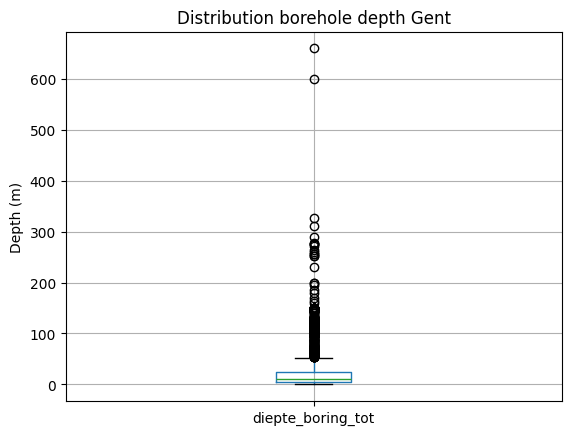
By discarding the boreholes with a depth of 0 m, we get a different result:
[16]:
df[df.diepte_boring_tot != 0].describe()
[16]:
| diepte_boring_tot | |
|---|---|
| count | 2749.000000 |
| mean | 25.827072 |
| std | 41.118876 |
| min | 0.100000 |
| 25% | 5.000000 |
| 50% | 10.000000 |
| 75% | 24.000000 |
| max | 660.000000 |
[17]:
ax = df[df.diepte_boring_tot != 0].boxplot()
ax.set_ylabel("Depth (m)");
ax.set_title("Distribution borehole depth Gent");
Get boreholes based on fields not available in the standard output dataframe
To keep the output dataframe size acceptable, not all available WFS fields are included in the standard output. However, one can use this information to select boreholes as illustrated below.
For example, make a selection of the boreholes in municipality the of Antwerp, for which a hydrogeological interpretation was performed:
[18]:
from owslib.fes2 import And

query = And([PropertyIsEqualTo(propertyname='gemeente',
                               literal='Antwerpen'),
             PropertyIsEqualTo(propertyname='hydrogeologische_stratigrafie',
                               literal='True')]
            )
df = boring.search(query=query,
                   return_fields=('pkey_boring', 'boornummer', 'x', 'y', 'diepte_boring_tot', 'datum_aanvang'))
df.head()
[000/001] .
[18]:
| pkey_boring | boornummer | x | y | diepte_boring_tot | datum_aanvang | |
|---|---|---|---|---|---|---|
| 0 | https://www.dov.vlaanderen.be/data/boring/1937... | kb7d14e-B82 | 145457.0 | 224973.5 | 10.0 | 1937-01-01 |
| 1 | https://www.dov.vlaanderen.be/data/boring/1969... | kb7d14e-B110 | 143700.4 | 228086.3 | 12.0 | 1969-01-01 |
| 2 | https://www.dov.vlaanderen.be/data/boring/1966... | kb7d14e-B115 | 143067.0 | 227707.6 | 66.0 | 1966-01-01 |
| 3 | https://www.dov.vlaanderen.be/data/boring/1966... | kb7d14e-B117 | 144770.5 | 223430.6 | 49.0 | 1966-01-01 |
| 4 | https://www.dov.vlaanderen.be/data/boring/1970... | kb7d14e-B121 | 143597.8 | 223498.6 | 11.9 | 1970-01-01 |
Get borehole data, returning fields not available in the standard output dataframe
As denoted in the previous example, not all available fields are available in the default output frame to keep its size limited. However, you can request any available field by including it in the return_fields parameter of the search:
[19]:
query = PropertyIsGreaterThanOrEqualTo(
            propertyname='diepte_boring_tot',
            literal='2000')

df = boring.search(query=query,
                   return_fields=('pkey_boring', 'boornummer', 'diepte_boring_tot',
                                  'informele_stratigrafie', 'formele_stratigrafie', 'lithologische_beschrijving',
                                  'gecodeerde_lithologie', 'hydrogeologische_stratigrafie', 'quartaire_stratigrafie',
                                  'geotechnische_codering', 'informele_hydrostratigrafie'))

df.head()
[000/001] .
[19]:
| pkey_boring | boornummer | diepte_boring_tot | informele_stratigrafie | formele_stratigrafie | lithologische_beschrijving | gecodeerde_lithologie | hydrogeologische_stratigrafie | quartaire_stratigrafie | geotechnische_codering | informele_hydrostratigrafie | |
|---|---|---|---|---|---|---|---|---|---|---|---|
| 0 | https://www.dov.vlaanderen.be/data/boring/1981... | kb8d7e-B224 | 2517.0 | True | True | True | False | False | False | False | False |
| 1 | https://www.dov.vlaanderen.be/data/boring/1952... | kb8d17e-B272 | 2705.0 | True | True | True | True | True | False | False | False |
| 2 | https://www.dov.vlaanderen.be/data/boring/1935... | kb17d31e-B197 | 2034.0 | True | True | False | True | True | False | False | False |
| 3 | https://www.dov.vlaanderen.be/data/boring/2016... | B/1-102782 | 3600.0 | False | False | False | False | False | False | False | False |
| 4 | https://www.dov.vlaanderen.be/data/boring/2016... | B/1-102783 | 3600.0 | False | False | False | False | False | False | False | False |
Visualize results
Using Folium, we can display the results of our search on a map.
[21]:
# import the necessary modules (not included in the requirements of pydov!)
import folium
from folium.plugins import MarkerCluster
from pyproj import Transformer
[22]:
# convert the coordinates to lat/lon for folium
def convert_latlon(x1, y1):
    transformer = Transformer.from_crs("epsg:31370", "epsg:4326", always_xy=True)
    x2,y2 = transformer.transform(x1, y1)
    return x2, y2

df['lon'], df['lat'] = zip(*map(convert_latlon, df['x'], df['y']))
# convert to list
loclist = df[['lat', 'lon']].values.tolist()
[23]:
# initialize the Folium map on the centre of the selected locations, play with the zoom until ok
fmap = folium.Map(location=[df['lat'].mean(), df['lon'].mean()], zoom_start=12)
marker_cluster = MarkerCluster().add_to(fmap)
for loc in range(0, len(loclist)):
    folium.Marker(loclist[loc], popup=df['boornummer'][loc]).add_to(marker_cluster)
fmap
[23]:
Adding location and height details
There is more to the location of a borehole than meets the eye! The default dataframe lists already multiple fields regarding the location of the borehole, both planimetric as altimetric:
xandyare the planimetric coordinates of the boreholestart_boring_mtawis the height of the start (aanvangspeil) of the boreholemv_mtawis the height of the ground level at the time of the making of the borehole
However, we have more information available regarding the (origin of) these coordinates. Each of them has an associated method (methode) and reliability (betrouwbaarheid).
We also make the distinction between the height of the ground level (maaiveld) and the height of the start of the borehole (aanvangspeil). If the borehole was started at ground level both are the same, but this is not necessarily the case. Furthermore the height of the start of the borehole can be either absolute (measured individually) or relative to the ground level.
If we want to have all this extra information available when retrieving the borehole dataframe output, we can add the extra XML fields when searching for boreholes.
To find which extra fieldsets are availabe, you can use:
[24]:
from pydov.types.boring import Boring

Boring.get_fieldsets()
[24]:
{'MethodeXyz': {'name': 'MethodeXyz',
  'class': pydov.types.boring.MethodeXyz,
  'definition': 'Fieldset containing fields for method and reliability of the point\nlocation of the borehole. It has the following fields: methode_xy, betrouwbaarheid_xy, methode_z, betrouwbaarheid_z.'}}
To add the extra fields to your output dataframe, you can specify the fieldset to use when instantiating the search class:
[25]:
from pydov.search.boring import BoringSearch
from pydov.types.boring import MethodeXyz

boring_search = BoringSearch(
    objecttype=Boring.with_extra_fields(MethodeXyz)
)
The extra fields are now available, and should be included in the output of get_fields(). E.g. to get more details about the methode_z field:
[26]:
boring_search.get_fields()['methode_z']
[26]:
methode_z - Methode waarop de z-coordinaat opgemeten werd.
- type: string
- notnull: False
- query: False
- cost: 10
- multivalue: False
- codelist:
DHM_v1 100m*100m - DHM_v1 100m*100m
DHM_v1 25m*25m - DHM_v1 25m*25m
DHM_v1 5m*5m - DHM_v1 5m*5m
DHM_v2 - DHM_v2
GPS - GPS
GPS - RTK FLEPOS - GPS - RTK FLEPOS
GPS - RTK FLEPOS (model hBG03) - GPS - RTK FLEPOS (model hBG03)
GPS - RTK FLEPOS (model hBG18) - GPS - RTK FLEPOS (model hBG18)
GPS statische fasemeting - GPS statische fasemeting
afgeleid van topokaart - afgeleid van topokaart
berekend op basis van hoogteverschil met maaiveld - berekend op basis van hoogteverschil met maaiveld
gedigitaliseerd in Google Earth - gedigitaliseerd in Google Earth
methode onbekend - methode onbekend
niet te achterhalen - niet te achterhalen
topografisch ingemeten - topografisch ingemeten
totaalstation - totaalstation
uit dossier - uit dossier
Searching for boreholes remains exactly the same, but will reveal the extra information in the output dataframe:
[31]:
from pydov.util.location import WithinDistance, Point

df = boring_search.search(
    location=WithinDistance(Point(150000, 150000, epsg=31370), 10000, 'meter'),
    return_fields=('pkey_boring', 'boornummer', 'x', 'y', 'methode_xy', 'betrouwbaarheid_xy',
                   'mv_mtaw', 'methode_z', 'betrouwbaarheid_z', 'start_boring_mtaw'))
[000/001] .
[000/544] cccccccccccccccccccccccccccccccccccccccccccccccccc
[050/544] cccccccccccccccccccccccccccccccccccccccccccccccccc
[100/544] cccccccccccccccccccccccccccccccccccccccccccccccccc
[150/544] cccccccccccccccccccccccccccccccccccccccccccccccccc
[200/544] cccccccccccccccccccccccccccccccccccccccccccccccccc
[250/544] cccccccccccccccccccccccccccccccccccccccccccccccccc
[300/544] cccccccccccccccccccccccccccccccccccccccccccccccccc
[350/544] cccccccccccccccccccccccccccccccccccccccccccccccccc
[400/544] cccccccccccccccccccccccccccccccccccccccccccccccccc
[450/544] cccccccccccccccccccccccccccccccccccccccccccccccccc
[500/544] cccccccccccccccccccccccccccccccccccccccccccc
[32]:
df.head()
[32]:
| pkey_boring | boornummer | x | y | methode_xy | betrouwbaarheid_xy | mv_mtaw | methode_z | betrouwbaarheid_z | start_boring_mtaw | |
|---|---|---|---|---|---|---|---|---|---|---|
| 0 | https://www.dov.vlaanderen.be/data/boring/1891... | BGD115E0018C.2 | 145692.0 | 157605.0 | gedigitaliseerd op topokaart | twijfelachtig | 55.0 | afgeleid van topokaart | twijfelachtig | 55.0 |
| 1 | https://www.dov.vlaanderen.be/data/boring/1894... | vgmperceel6-B2 | 140857.0 | 151875.0 | gedigitaliseerd op topokaart | onbekend | 54.0 | afgeleid van topokaart | onbekend | 54.0 |
| 2 | https://www.dov.vlaanderen.be/data/boring/1913... | vgmperceel6-B4 | 140236.0 | 150691.0 | gedigitaliseerd op topokaart | onbekend | 85.0 | afgeleid van topokaart | onbekend | 85.0 |
| 3 | https://www.dov.vlaanderen.be/data/boring/1927... | vgmperceel6-B9 | 142139.0 | 151678.0 | gedigitaliseerd op topokaart | onbekend | 75.0 | afgeleid van topokaart | onbekend | 75.0 |
| 4 | https://www.dov.vlaanderen.be/data/boring/1927... | vgmperceel6-B10 | 144692.0 | 152764.0 | gedigitaliseerd op topokaart | onbekend | 93.0 | afgeleid van topokaart | onbekend | 93.0 |
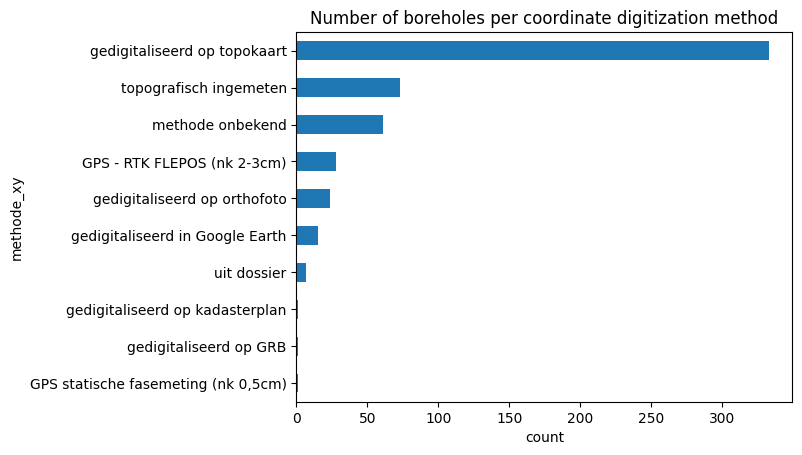
[33]:
df_plot = df.groupby('methode_xy').size().sort_values()

ax = df_plot.plot.barh()

ax.set_xlabel("count")
ax.set_title("Number of boreholes per coordinate digitization method")
[33]:
Text(0.5, 1.0, 'Number of boreholes per coordinate digitization method')
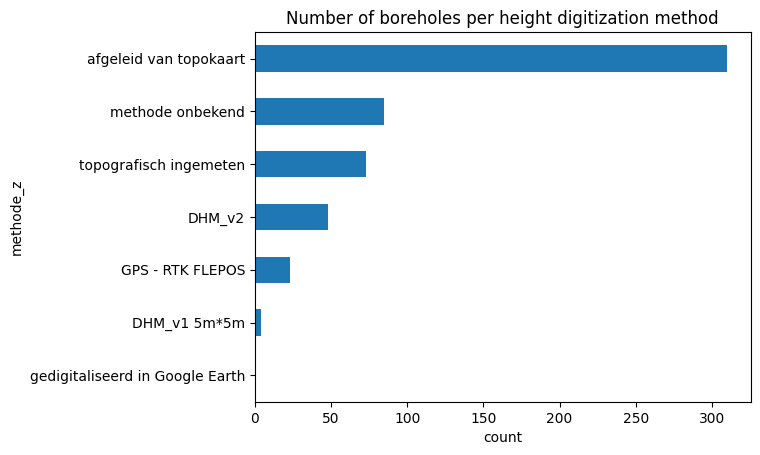
[34]:
df_plot = df.groupby('methode_z').size().sort_values()

ax = df_plot.plot.barh()

ax.set_xlabel("count")
ax.set_title("Number of boreholes per height digitization method")
[34]:
Text(0.5, 1.0, 'Number of boreholes per height digitization method')
Adding color to the Borehole dataframe
The default dataframe of the Boring datatype contains information about the ‘boormethode’ as its subtype. However, in the DOV database there is information about the observed color of the soil in the various depth intervals available as well. We can access this data in pydov by using the subtype Kleur.
To check the available subtypes for a the Boring type, you can use:
[35]:
from pydov.types.boring import Boring

Boring.get_subtypes()
[35]:
{'BoorMethode': {'name': 'BoorMethode',
  'class': pydov.types.boring.BoorMethode,
  'definition': 'Subtype listing the method used to make the borehole. It has the following fields: diepte_methode_van, diepte_methode_tot, boormethode.'},
 'Kleur': {'name': 'Kleur',
  'class': pydov.types.boring.Kleur,
  'definition': 'Subtype listing the color values of the borehole. It has the following fields: diepte_kleur_van, diepte_kleur_tot, kleur.'}}
To retrieve the colors instead of the method, we can instantiate the search class with the Kleur subtype:
[36]:
from pydov.search.boring import BoringSearch
from pydov.types.boring import Kleur

boring_search = BoringSearch(
    objecttype=Boring.with_subtype(Kleur)
)
The extra fields are now available, and should be included in the output of get_fields(). E.g. to get more details about the kleur field:
[37]:
boring_search.get_fields()['kleur']
[37]:
kleur - Grondkleur voor het diepte-interval
- type: string
- notnull: False
- query: False
- cost: 10
- multivalue: False
And the color data is returned when querying:
[38]:
boring_search.search(
    location=WithinDistance(Point(157647.0, 186350.0, epsg=31370), 10))
[000/001] .
[000/001] .
[38]:
| pkey_boring | boornummer | x | y | mv_mtaw | start_boring_mtaw | gemeente | diepte_boring_van | diepte_boring_tot | datum_aanvang | uitvoerder | boorgatmeting | diepte_kleur_van | diepte_kleur_tot | kleur | |
|---|---|---|---|---|---|---|---|---|---|---|---|---|---|---|---|
| 0 | https://www.dov.vlaanderen.be/data/boring/1966... | GEO-66/037-IIA-b202 | 157647.0 | 186350.0 | NaN | 7.45 | NaN | 0.0 | 6.0 | 1966-06-28 | Rijksinstituut voor Grondmechanica | False | 0.00 | 1.25 | bruin |
| 1 | https://www.dov.vlaanderen.be/data/boring/1966... | GEO-66/037-IIA-b202 | 157647.0 | 186350.0 | NaN | 7.45 | NaN | 0.0 | 6.0 | 1966-06-28 | Rijksinstituut voor Grondmechanica | False | 1.25 | 2.30 | bruinroest |
| 2 | https://www.dov.vlaanderen.be/data/boring/1966... | GEO-66/037-IIA-b202 | 157647.0 | 186350.0 | NaN | 7.45 | NaN | 0.0 | 6.0 | 1966-06-28 | Rijksinstituut voor Grondmechanica | False | 2.30 | 2.75 | bruin |
| 3 | https://www.dov.vlaanderen.be/data/boring/1966... | GEO-66/037-IIA-b202 | 157647.0 | 186350.0 | NaN | 7.45 | NaN | 0.0 | 6.0 | 1966-06-28 | Rijksinstituut voor Grondmechanica | False | 2.75 | 2.90 | bruin |
| 4 | https://www.dov.vlaanderen.be/data/boring/1966... | GEO-66/037-IIA-b202 | 157647.0 | 186350.0 | NaN | 7.45 | NaN | 0.0 | 6.0 | 1966-06-28 | Rijksinstituut voor Grondmechanica | False | 2.90 | 3.40 | groenzwart |
| 5 | https://www.dov.vlaanderen.be/data/boring/1966... | GEO-66/037-IIA-b202 | 157647.0 | 186350.0 | NaN | 7.45 | NaN | 0.0 | 6.0 | 1966-06-28 | Rijksinstituut voor Grondmechanica | False | 3.40 | 4.30 | donkerbruin |
| 6 | https://www.dov.vlaanderen.be/data/boring/1966... | GEO-66/037-IIA-b202 | 157647.0 | 186350.0 | NaN | 7.45 | NaN | 0.0 | 6.0 | 1966-06-28 | Rijksinstituut voor Grondmechanica | False | 4.30 | 4.75 | grijs |
| 7 | https://www.dov.vlaanderen.be/data/boring/1966... | GEO-66/037-IIA-b202 | 157647.0 | 186350.0 | NaN | 7.45 | NaN | 0.0 | 6.0 | 1966-06-28 | Rijksinstituut voor Grondmechanica | False | 4.75 | 6.00 | grijs |