Workshop introduction pydov

What is pydov?
A Python package to easily use DOV data in other scripts and tools
Searching on attributes and location
Combine with other datasets
Results available in a Pandas DataFrame
A reference client implementation of our metadata, WFS and XML services
A community project
Open development on GitHub: https://github.com/DOV-Vlaanderen/pydov/
Open-source license: MIT
Contribute yourself?
Issues for questions
Documentation
Code
Installation
pip install -U pydov[geom]
Quick start
[1]:
from pydov.search.boring import BoringSearch

from pydov.util.location import Within, Box

from owslib.fes2 import PropertyIsGreaterThan

boring_search = BoringSearch()

dataframe = boring_search.search(
    query=PropertyIsGreaterThan(propertyname='diepte_tot_m', literal='550'),
    location=Within(Box(107500, 202000, 108500, 203000, epsg=31370))
)

dataframe
[000/001] .
[000/002] cc
[1]:
| pkey_boring | boornummer | x | y | mv_mtaw | start_boring_mtaw | gemeente | diepte_boring_van | diepte_boring_tot | datum_aanvang | uitvoerder | boorgatmeting | diepte_methode_van | diepte_methode_tot | boormethode | |
|---|---|---|---|---|---|---|---|---|---|---|---|---|---|---|---|
| 0 | https://www.dov.vlaanderen.be/data/boring/1989... | kb14d40e-B777 | 108015.0 | 202860.0 | 5.0 | 5.0 | Gent | 0.0 | 660.0 | 1989-01-25 | onbekend | False | 0.0 | 660.0 | onbekend |
| 1 | https://www.dov.vlaanderen.be/data/boring/1972... | kb14d40e-B778 | 108090.0 | 202835.0 | 5.0 | 5.0 | Gent | 0.0 | 600.0 | 1972-05-17 | onbekend | False | 0.0 | 600.0 | onbekend |
Select datasets
To retrieve data you must first choose which datasets you want to query.
Search objects
Each of the available datasets has a corresponding search object to query the data.
The following code creates three search objects to query data about Boreholes, Samples and Observations respectively.
[2]:
from pydov.search.boring import BoringSearch
from pydov.search.monster import MonsterSearch
from pydov.search.observatie import ObservatieSearch

boring_search = BoringSearch()
monster_search = MonsterSearch()
observatie_search = ObservatieSearch()
Exercise: which search object can you use to find groundwater level measurements?
Answer from pydov.search.grondwaterfilter import GrondwaterFilterSearch
grondwaterfilter_search = GrondwaterFilterSearch()
Object types
Each search object is linked to an object type, which determines which fields are available in the result by default.
When creating the search object, you can optionally specify the object type to influence which fields will be returned. The following code is equivalent to the earlier version of observatie_search:
[3]:
from pydov.search.observatie import ObservatieSearch

from pydov.types.observatie import Observatie

observatie_search = ObservatieSearch(
    objecttype=Observatie
)
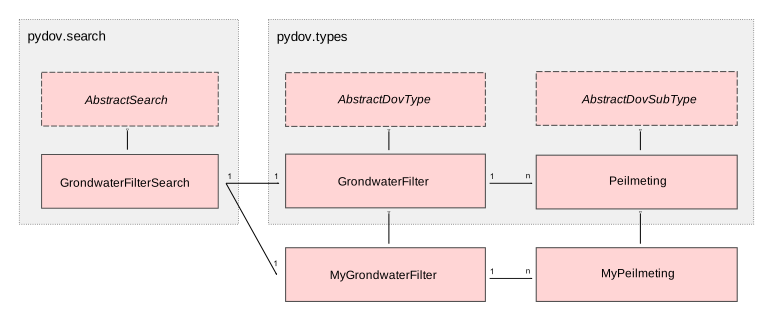
The following schema clarifies the difference between search objects, object types and subtypes. A search object determines which fields can be searched on, an object type determines which fields can be returned in the result. For each record in the search result there is at most one result from the (main) object type, and there can be multiple records from the subtype.
Fieldsets
For some object types, extra fields are available that are not present in the result by default, but can be added easily. Using the get_fieldsets() method on an object type, you can query which sets are available.
[4]:
from pydov.search.observatie import ObservatieSearch
from pydov.types.observatie import Observatie

Observatie.get_fieldsets()
[4]:
{'ObservatieDetails': {'name': 'ObservatieDetails',
  'class': pydov.types.observatie.ObservatieDetails,
  'definition': 'Fieldset containing fields with extra details about the observation. It has the following fields: betrouwbaarheid, geobserveerd_object_type, geobserveerd_object_naam, geobserveerd_object_permkey.'}}
[5]:
from pydov.types.observatie import ObservatieDetails

observatie_search = ObservatieSearch(
    objecttype=Observatie.with_extra_fields(ObservatieDetails)
)
Exercise: which fieldsets are available for Boreholes?
Answer
MethodeXyz
from pydov.types.boring import Boring
Boring.get_fieldsets()
Subtypes
For some object types, extra subtypes are available, which can be used instead of the default subtype. Using the get_subtypes() method on an object type, you can query which subtypes are available.
[6]:
from pydov.search.observatie import ObservatieSearch
from pydov.types.observatie import Observatie

Observatie.get_subtypes()
[6]:
{'Fractiemeting': {'name': 'Fractiemeting',
  'class': pydov.types.observatie.Fractiemeting,
  'definition': 'Subtype showing the details of a fraction measurement. It has the following fields: fractiemeting_ondergrens, fractiemeting_bovengrens, fractiemeting_waarde.'},
 'Meetreeks': {'name': 'Meetreeks',
  'class': pydov.types.observatie.Meetreeks,
  'definition': 'Subtype showing the details of a measurement series. It has the following fields: meetreeks_meetpunt_parameter, meetreeks_meetpunt, meetreeks_meetpunt_eenheid, meetreeks_meetwaarde_parameter, meetreeks_meetwaarde, meetreeks_meetwaarde_eenheid.'},
 'ObservatieHerhaling': {'name': 'ObservatieHerhaling',
  'class': pydov.types.observatie.ObservatieHerhaling,
  'definition': 'Subtype showing the repetition information of an observation. It has the following fields: herhaling_aantal, herhaling_minimum, herhaling_maximum, herhaling_standaardafwijking.'},
 'SecundaireParameter': {'name': 'SecundaireParameter',
  'class': pydov.types.observatie.SecundaireParameter,
  'definition': 'Subtype showing the secondary parameter of an observation. It has the following fields: secundaireparameter_parameter, secundaireparameter_resultaat, secundaireparameter_eenheid.'}}
[7]:
from pydov.types.observatie import SecundaireParameter

observatie_search = ObservatieSearch(
    objecttype=Observatie.with_subtype(SecundaireParameter)
)
Exercise: which subtypes are available for Groundwater Filters?
Answer
Gxg and Peilmeting
from pydov.types.grondwaterfilter import GrondwaterFilter
GrondwaterFilter.get_subtypes()
Search by location
Geographical search can be done with the location parameter of the search method. You provide a geographical filter and a geometry object, or a filter factory based on a geodataframe or vector GIS file.
Overlap with rectangle
Searching for objects that overlap with a rectangular area is simple:
[8]:
from pydov.search.observatie import ObservatieSearch
from pydov.util.location import Within, Box

observatie_search = ObservatieSearch()

observatie_search.search(
    location=Within(Box(minx=200000, miny=211000, maxx=201000, maxy=212000, epsg=31370))
)
[000/001] .
[8]:
| pkey_observatie | pkey_parent | fenomeentijd | diepte_van_m | diepte_tot_m | parametergroep | parameter | detectieconditie | resultaat | eenheid | methode | uitvoerder | herkomst | |
|---|---|---|---|---|---|---|---|---|---|---|---|---|---|
| 0 | https://www.dov.vlaanderen.be/data/observatie/... | https://www.dov.vlaanderen.be/data/monster/196... | 1968-01-01 | NaN | NaN | Bodem_chemisch | pH H2O (ph_h2o) | NaN | 5.8 | - | NaN | Centrum voor Grondonderzoek (C.V.G.) | LABO |
| 1 | https://www.dov.vlaanderen.be/data/observatie/... | https://www.dov.vlaanderen.be/data/monster/196... | 1968-01-01 | NaN | NaN | Bodem_chemisch | Organische C - percentage (organische_c_perc) | NaN | 3.69 | % | Aardewerk nieuwe methode organische koolstof | Centrum voor Grondonderzoek (C.V.G.) | LABO |
| 2 | https://www.dov.vlaanderen.be/data/observatie/... | https://www.dov.vlaanderen.be/data/monster/196... | 1968-01-01 | NaN | NaN | Bodem_fysisch_textuur | Textuur - grove fractie (groter dan 2000 µm) (... | NaN | 0.0 | % | NaN | Centrum voor Grondonderzoek (C.V.G.) | LABO |
| 3 | https://www.dov.vlaanderen.be/data/observatie/... | https://www.dov.vlaanderen.be/data/monster/196... | 1968-01-01 | NaN | NaN | Bodem_fysisch_textuur | Textuur - handmatig - fout groter dan 5% (tex... | NaN | ja | NaN | NaN | Centrum voor Grondonderzoek (C.V.G.) | LABO |
| 4 | https://www.dov.vlaanderen.be/data/observatie/... | https://www.dov.vlaanderen.be/data/monster/196... | 1968-01-01 | NaN | NaN | Bodem_fysisch_textuur | Mediaan van de textuurfracties (textuur_mediaan) | NaN | 140 | µm | NaN | Centrum voor Grondonderzoek (C.V.G.) | LABO |
| 5 | https://www.dov.vlaanderen.be/data/observatie/... | https://www.dov.vlaanderen.be/data/monster/196... | 1968-01-01 | NaN | NaN | Bodem_chemisch | Calciumcarbonaatgehalte (caco3_gehalte) | NaN | 0.0 | % | NaN | Centrum voor Grondonderzoek (C.V.G.) | LABO |
| 6 | https://www.dov.vlaanderen.be/data/observatie/... | https://www.dov.vlaanderen.be/data/monster/196... | 1968-01-01 | NaN | NaN | Bodem_fysisch_textuur | Textuurfracties (textuurmeting) | NaN | NaN | % | NaN | Centrum voor Grondonderzoek (C.V.G.) | LABO |
| 7 | https://www.dov.vlaanderen.be/data/observatie/... | https://www.dov.vlaanderen.be/data/monster/196... | 1968-01-01 | NaN | NaN | Bodem_fysisch_textuur | Textuur - granulometrie - klasse bodemkarterin... | NaN | Z - Zand | NaN | NaN | Centrum voor Grondonderzoek (C.V.G.) | LABO |
| 8 | https://www.dov.vlaanderen.be/data/observatie/... | https://www.dov.vlaanderen.be/data/monster/196... | 1968-01-01 | NaN | NaN | Bodem_fysisch_textuur | Textuur - handmatig - klassen bodemkartering (... | NaN | S - Lemig zand | - | NaN | Centrum voor Grondonderzoek (C.V.G.) | LABO |
Exercise: how many samples are in the rectangle with coordinates [150000, 150000, 175000, 175000]?
Answer
8669
from pydov.search.monster import MonsterSearch from pydov.util.location import Within, Box
monster_search = MonsterSearch()
monster_search.search( location=Within(Box(minx=150000, miny=150000, maxx=175000, maxy=175000, epsg=31370)) )
Buffer around point location
You can also search on a circular buffer around a point location:
[9]:
from pydov.search.observatie import ObservatieSearch
from pydov.util.location import WithinDistance, Point

observatie_search = ObservatieSearch()

observatie_search.search(
    location=WithinDistance(
        Point(x=200000, y=205000, epsg=31370),
        distance=500)
)
[000/001] .
[9]:
| pkey_observatie | pkey_parent | fenomeentijd | diepte_van_m | diepte_tot_m | parametergroep | parameter | detectieconditie | resultaat | eenheid | methode | uitvoerder | herkomst | |
|---|---|---|---|---|---|---|---|---|---|---|---|---|---|
| 0 | https://www.dov.vlaanderen.be/data/observatie/... | https://www.dov.vlaanderen.be/data/monster/202... | 2025-06-30 | NaN | NaN | Zware metalen | Chroom (Cr) | NaN | 1.149 | µg/l | Onbekend | Eurofins Analytico B.V. | LABO |
| 1 | https://www.dov.vlaanderen.be/data/observatie/... | https://www.dov.vlaanderen.be/data/monster/202... | 2025-06-30 | NaN | NaN | Anionen | Bicarbonaat (HCO3) | NaN | 5.5 | mg/l | Onbekend | Eurofins Analytico B.V. | LABO |
| 2 | https://www.dov.vlaanderen.be/data/observatie/... | https://www.dov.vlaanderen.be/data/monster/202... | 2025-06-30 | NaN | NaN | Fysico-chemische parameters | Opgeloste zuurstof (O2) | NaN | 1.2 | mg/l | Onbekend | Eurofins Analytico B.V. | VELD |
| 3 | https://www.dov.vlaanderen.be/data/observatie/... | https://www.dov.vlaanderen.be/data/monster/202... | 2025-06-30 | NaN | NaN | Kationen | Natrium (Na) | NaN | 13.0 | mg/l | Onbekend | Eurofins Analytico B.V. | LABO |
| 4 | https://www.dov.vlaanderen.be/data/observatie/... | https://www.dov.vlaanderen.be/data/monster/202... | 2025-06-30 | NaN | NaN | Kationen | Kalium (K) | NaN | 10.7 | mg/l | Onbekend | Eurofins Analytico B.V. | LABO |
| ... | ... | ... | ... | ... | ... | ... | ... | ... | ... | ... | ... | ... | ... |
| 3573 | https://www.dov.vlaanderen.be/data/observatie/... | https://www.dov.vlaanderen.be/data/monster/202... | 2022-11-17 | NaN | NaN | Anionen | Sulfaat (SO4) | NaN | 49.8 | mg/l | Onbekend | Eurofins Analytico B.V. | LABO |
| 3574 | https://www.dov.vlaanderen.be/data/observatie/... | https://www.dov.vlaanderen.be/data/monster/202... | 2022-11-17 | NaN | NaN | Anionen | Chloriden (Cl) | NaN | 32.7 | mg/l | Onbekend | Eurofins Analytico B.V. | LABO |
| 3575 | https://www.dov.vlaanderen.be/data/observatie/... | https://www.dov.vlaanderen.be/data/monster/202... | 2022-11-17 | NaN | NaN | Zware metalen | Aluminium (Al) | NaN | 0.104 | mg/l | Onbekend | Eurofins Analytico B.V. | LABO |
| 3576 | https://www.dov.vlaanderen.be/data/observatie/... | https://www.dov.vlaanderen.be/data/monster/202... | 2022-11-17 | NaN | NaN | Kationen | Kalium (K) | NaN | 22.0 | mg/l | Onbekend | Eurofins Analytico B.V. | LABO |
| 3577 | https://www.dov.vlaanderen.be/data/observatie/... | https://www.dov.vlaanderen.be/data/monster/202... | 2022-11-17 | NaN | NaN | Zware metalen | Arseen (As) | < | 5.000 | µg/l | Onbekend | Eurofins Analytico B.V. | LABO |
3578 rows × 13 columns
Exercise: how many observations are within a radius of 250 meters of the belfort of Ghent?
Answer
7
from pydov.search.observatie import ObservatieSearch from pydov.util.location import WithinDistance, Point
observatie_search = ObservatieSearch()
observatie_search.search( location=WithinDistance( Point(x=3.725278, y=51.053889, epsg=4326), distance=250) )
GeoPandas geodataframe
You can also search geographically based on a Geodataframe. This can be used in a GeopandasFilter factory, together with a location filter.
Below we first create a geodataframe:
[10]:
import geopandas as gpd

shapefile = "../../tests/data/util/location/polygon_multiple_31370.shp"

geodataframe = gpd.read_file(shapefile)
geodataframe["name"] = ["site 1", "site 2"]
geodataframe
[10]:
| gml_id | geometry | name | |
|---|---|---|---|
| 0 | polygon_multiple_31370.0 | POLYGON ((108636.15 194960.844, 109195.574 195... | site 1 |
| 1 | polygon_multiple_31370.1 | POLYGON ((107485.786 196741.544, 108297.344 19... | site 2 |
We can now use this in a pydov search query, for example to find boreholes:
[11]:
from pydov.search.boring import BoringSearch
from pydov.util.location import Within, GeopandasFilter

boring_search = BoringSearch()

boring_search.search(
    location=GeopandasFilter(geodataframe, Within)
)
[000/001] .
[000/018] cccccccccccccccccc
[11]:
| pkey_boring | boornummer | x | y | mv_mtaw | start_boring_mtaw | gemeente | diepte_boring_van | diepte_boring_tot | datum_aanvang | uitvoerder | boorgatmeting | diepte_methode_van | diepte_methode_tot | boormethode | |
|---|---|---|---|---|---|---|---|---|---|---|---|---|---|---|---|
| 0 | https://www.dov.vlaanderen.be/data/boring/2018... | B/4-104356 | 108025.00 | 196593.00 | 8.05 | 8.05 | Gent | 0.0 | 7.0 | NaN | NaN | False | 0.0 | 0.0 | onbekend |
| 1 | https://www.dov.vlaanderen.be/data/boring/2019... | 1718-B-180092 | 107947.29 | 196640.52 | 7.96 | 7.96 | NaN | 0.0 | 8.0 | 2019-03-11 | Verhofste | False | 0.0 | 8.0 | spoelboring |
| 2 | https://www.dov.vlaanderen.be/data/boring/2020... | 1718-B-190135 | 107991.00 | 196706.00 | 8.40 | 8.40 | NaN | 0.0 | 8.0 | 2020-05-15 | Verhofste | False | 0.0 | 8.0 | spoelboring |
| 3 | https://www.dov.vlaanderen.be/data/boring/2022... | 1407-B0863 | 107842.53 | 196371.08 | 7.38 | 7.38 | Gent | 0.0 | 4.0 | 2022-06-08 | De Backer Putboringen | False | 0.0 | 4.0 | spoelboring |
| 4 | https://www.dov.vlaanderen.be/data/boring/2023... | 1718-B220073 | 108144.95 | 196771.09 | 9.18 | 9.18 | NaN | 0.0 | 4.0 | 2023-04-13 | Verhofste | False | 0.0 | 4.0 | spoelboring |
| ... | ... | ... | ... | ... | ... | ... | ... | ... | ... | ... | ... | ... | ... | ... | ... |
| 63 | https://www.dov.vlaanderen.be/data/boring/1893... | kb22d55e-B44 | 108900.00 | 194425.00 | 6.00 | 6.00 | Destelbergen | 0.0 | 21.0 | 1893-01-01 | Behiels-(Lemmens)-Wetteren | False | 0.0 | 21.0 | onbekend |
| 64 | https://www.dov.vlaanderen.be/data/boring/1894... | kb22d55e-B102 | 107618.00 | 196709.00 | 7.50 | 7.50 | Gent | 0.0 | 0.0 | 1894-01-01 | onbekend | False | 0.0 | 0.0 | onbekend |
| 65 | https://www.dov.vlaanderen.be/data/boring/1894... | kb22d55e-B103 | 107791.00 | 196516.00 | 7.50 | 7.50 | Gent | 0.0 | 0.0 | 1894-01-01 | onbekend | False | 0.0 | 0.0 | onbekend |
| 66 | https://www.dov.vlaanderen.be/data/boring/1895... | kb22d55e-B400 | 109050.00 | 194990.00 | 7.00 | 7.00 | Destelbergen | 0.0 | 0.0 | 1895-01-01 | onbekend | False | 0.0 | 0.0 | onbekend |
| 67 | https://www.dov.vlaanderen.be/data/boring/1895... | kb22d55e-B425 | 108742.00 | 194936.00 | 7.00 | 7.00 | Destelbergen | 0.0 | 0.0 | 1895-01-01 | onbekend | False | 0.0 | 0.0 | onbekend |
68 rows × 15 columns
We can also directly use a GIS file (for example a Shapefile) with a GeometryFilter factory:
[12]:
from pydov.search.boring import BoringSearch
from pydov.util.location import Within, GeometryFilter

boring_search = BoringSearch()

studiegebied = '../../tests/data/util/location/polygon_multiple_31370.shp'

boring_search.search(
    location=GeometryFilter(studiegebied, Within)
)
[000/001] .
[000/018] cccccccccccccccccc
[12]:
| pkey_boring | boornummer | x | y | mv_mtaw | start_boring_mtaw | gemeente | diepte_boring_van | diepte_boring_tot | datum_aanvang | uitvoerder | boorgatmeting | diepte_methode_van | diepte_methode_tot | boormethode | |
|---|---|---|---|---|---|---|---|---|---|---|---|---|---|---|---|
| 0 | https://www.dov.vlaanderen.be/data/boring/2018... | B/4-104356 | 108025.00 | 196593.00 | 8.05 | 8.05 | Gent | 0.0 | 7.0 | NaN | NaN | False | 0.0 | 0.0 | onbekend |
| 1 | https://www.dov.vlaanderen.be/data/boring/2019... | 1718-B-180092 | 107947.29 | 196640.52 | 7.96 | 7.96 | NaN | 0.0 | 8.0 | 2019-03-11 | Verhofste | False | 0.0 | 8.0 | spoelboring |
| 2 | https://www.dov.vlaanderen.be/data/boring/2020... | 1718-B-190135 | 107991.00 | 196706.00 | 8.40 | 8.40 | NaN | 0.0 | 8.0 | 2020-05-15 | Verhofste | False | 0.0 | 8.0 | spoelboring |
| 3 | https://www.dov.vlaanderen.be/data/boring/2022... | 1407-B0863 | 107842.53 | 196371.08 | 7.38 | 7.38 | Gent | 0.0 | 4.0 | 2022-06-08 | De Backer Putboringen | False | 0.0 | 4.0 | spoelboring |
| 4 | https://www.dov.vlaanderen.be/data/boring/2023... | 1718-B220073 | 108144.95 | 196771.09 | 9.18 | 9.18 | NaN | 0.0 | 4.0 | 2023-04-13 | Verhofste | False | 0.0 | 4.0 | spoelboring |
| ... | ... | ... | ... | ... | ... | ... | ... | ... | ... | ... | ... | ... | ... | ... | ... |
| 63 | https://www.dov.vlaanderen.be/data/boring/1893... | kb22d55e-B44 | 108900.00 | 194425.00 | 6.00 | 6.00 | Destelbergen | 0.0 | 21.0 | 1893-01-01 | Behiels-(Lemmens)-Wetteren | False | 0.0 | 21.0 | onbekend |
| 64 | https://www.dov.vlaanderen.be/data/boring/1894... | kb22d55e-B102 | 107618.00 | 196709.00 | 7.50 | 7.50 | Gent | 0.0 | 0.0 | 1894-01-01 | onbekend | False | 0.0 | 0.0 | onbekend |
| 65 | https://www.dov.vlaanderen.be/data/boring/1894... | kb22d55e-B103 | 107791.00 | 196516.00 | 7.50 | 7.50 | Gent | 0.0 | 0.0 | 1894-01-01 | onbekend | False | 0.0 | 0.0 | onbekend |
| 66 | https://www.dov.vlaanderen.be/data/boring/1895... | kb22d55e-B400 | 109050.00 | 194990.00 | 7.00 | 7.00 | Destelbergen | 0.0 | 0.0 | 1895-01-01 | onbekend | False | 0.0 | 0.0 | onbekend |
| 67 | https://www.dov.vlaanderen.be/data/boring/1895... | kb22d55e-B425 | 108742.00 | 194936.00 | 7.00 | 7.00 | Destelbergen | 0.0 | 0.0 | 1895-01-01 | onbekend | False | 0.0 | 0.0 | onbekend |
68 rows × 15 columns
Exercise: how many observations are located within or within a radius of 200 meters of the study area?
Answer
303
from pydov.search.observatie import ObservatieSearch from pydov.util.location import WithinDistance, GeometryFilter
observatie_search = ObservatieSearch()
observatie_search.search( location=GeometryFilter(studiegebied, WithinDistance, {‘distance’: 200}) )
Search by attributes
Next to searching by location, you can also search for objects with certain properties.
Available search fields
To find out which attributes (fields) are available in a datatype, you can use the get_fields() method. To specifically query the fields that can be searched on, use the following code:
[13]:
from pydov.search.monster import MonsterSearch

monster_search = MonsterSearch()

monster_search.get_fields(query=True)
[13]:
id - Uniek referentienummer in de databank.
- type: string
- notnull: False
- query: True
- cost: 1
- multivalue: False
naam - Naam van het monster.
- type: string
- notnull: False
- query: True
- cost: 1
- multivalue: False
pkey_monster - Permanente URL die verwijst naar de gegevens van het monster op de website.
- type: string
- notnull: False
- query: True
- cost: 1
- multivalue: False
gekoppeld_aan - Het ouder-object (parent) waaraan een monster gekoppeld is. Bijvoorbeeld een boring, een ander monster, ...
- type: string
- notnull: False
- query: True
- cost: 1
- multivalue: False
pkey_parents - Permanente URL die verwijst naar de gegevens van het gekoppeld ouder-object (parent) op de website.
- type: string
- notnull: False
- query: True
- cost: 1
- multivalue: True
materiaalklasse - Aard van het materiaal waaruit het monster bestaat, ingedeeld volgens een classificatie bijvoorbeeld sediment, hard gesteente.
- type: string
- notnull: False
- query: True
- cost: 1
- multivalue: False
diepte_van_m - Minimum diepte van het monster ten opzichte van het aanvangspeil van het gekoppeld ouder-object, in meter.
- type: float
- notnull: False
- query: True
- cost: 1
- multivalue: False
diepte_tot_m - Maximum diepte van het monster ten opzichte van het aanvangspeil van het gekoppeld ouder-object, in meter.
- type: float
- notnull: False
- query: True
- cost: 1
- multivalue: False
aantal_observaties - Aantal observaties die beschikbaar zijn bij het monster.
- type: integer
- notnull: False
- query: True
- cost: 1
- multivalue: False
datum_monstername - Datum van monstername.
- type: date
- notnull: False
- query: True
- cost: 1
- multivalue: False
monstersamenstelling - Samenstelling van het monster: enkelvoudig monster of mengmonster.
- type: string
- notnull: False
- query: True
- cost: 1
- multivalue: False
monstertype - Type monster of bemonstering: geroerd, ongeroerd, vloeistof.
- type: string
- notnull: False
- query: True
- cost: 1
- multivalue: False
- codelist:
geroerd - Geroerd - Monstername waarbij de oorspronkelijke structuur en gelaagdheid van het materiaal niet bewaard wordt. Het resulterende monster laat het niet toe een gedetailleerde beschrijving of bepaalde analyses met betrekking tot de structuur of gelaagdheid (bv. Bulkdensiteit, volumemassa, grondmechanische proeven, ....) uit te voeren.
ongeroerd - Ongeroerd - Monstername waarbij de oorspronkelijke structuur en gelaagdheid van het materiaal maximaal bewaard wordt.
vloeistof - Vloeistof - Het monster bestaat uit een van nature vloeibare stof (een stof die gemakkelijk vormveranderingen ondergaat, samendrukbaar is, maar zich verzet tegen deze volumeverandering). Het begrip gelaagdheid is niet relevant voor het karakteriseren van het materiaal waaruit het monster is genomen.
bemonsteringsprocedure - Een workflow, protocol, plan, algoritme of berekeningswijze waarin wordt gespecifieerd hoe de bemonstering moet worden uitgevoerd.
- type: string
- notnull: False
- query: True
- cost: 1
- multivalue: False
bemonsteringsinstrument - Het instrument waarmee de bemonstering is uitgevoerd.
- type: string
- notnull: False
- query: True
- cost: 1
- multivalue: True
bemonstering_door - De agent (persoon of organisatie) die de bemonstering heeft uitgevoerd.
- type: string
- notnull: False
- query: True
- cost: 1
- multivalue: False
opmerkingen - Aantal opmerkingen bij het monster.
- type: integer
- notnull: False
- query: True
- cost: 1
- multivalue: False
actuele_opslaglocatie - De plaats waar het monster is bewaard.
- type: string
- notnull: False
- query: True
- cost: 1
- multivalue: False
opdracht - Opdracht waaraan een monster gekoppeld is.
- type: string
- notnull: False
- query: True
- cost: 1
- multivalue: False
permkey_monster - Permkey van het monster als deel van de permanente URL.
- type: string
- notnull: False
- query: True
- cost: 1
- multivalue: False
Attribute equal to
Searching on attribute values can be done with the search operators from owslib.fes2: PropertyIsEqualTo, PropertyIsNotEqualTo, PropertyIsNull, PropertyIsLike, PropertyIsLessThan, PropertyIsLessThanOrEqualTo, PropertyIsGreaterThan, PropertyIsGreaterThanOrEqualTo, PropertyIsBetween.
For example, to query samples where the sample type is ‘ongeroerd’ (undisturbed), you can use the following code. The max_features parameter ensures that at most this number of features is returned; this is useful to test your query on a subset of the data.
[14]:
from pydov.search.monster import MonsterSearch

from owslib.fes2 import PropertyIsEqualTo

monster_search = MonsterSearch()

monster_search.search(
    query=PropertyIsEqualTo('monstertype', 'ongeroerd'),
    max_features=10
)
[000/001] .
[14]:
| pkey_monster | naam | pkey_parents | materiaalklasse | datum_monstername | diepte_van_m | diepte_tot_m | monstertype | monstersamenstelling | bemonsteringsprocedure | bemonsteringsinstrument | bemonstering_door | |
|---|---|---|---|---|---|---|---|---|---|---|---|---|
| 0 | https://www.dov.vlaanderen.be/data/monster/201... | 0 | (https://www.dov.vlaanderen.be/data/boring/198... | sediment | 1980-01-01 | 288.80 | 288.80 | ongeroerd | Enkelvoudig monster | NaN | (buis,) | NaN |
| 1 | https://www.dov.vlaanderen.be/data/monster/201... | 0 | (https://www.dov.vlaanderen.be/data/boring/190... | hardgesteente | 1901-01-01 | 541.00 | 542.20 | ongeroerd | Enkelvoudig monster | NaN | (kerboor,) | NaN |
| 2 | https://www.dov.vlaanderen.be/data/monster/201... | 0.002 | (https://www.dov.vlaanderen.be/data/boring/196... | sediment | 1964-01-01 | 17.38 | 17.38 | ongeroerd | Enkelvoudig monster | NaN | (kerboor,) | NaN |
| 3 | https://www.dov.vlaanderen.be/data/monster/201... | 1 | (https://www.dov.vlaanderen.be/data/boring/199... | sediment | 1995-01-01 | 102.25 | 102.25 | ongeroerd | Enkelvoudig monster | NaN | (kerboor,) | NaN |
| 4 | https://www.dov.vlaanderen.be/data/monster/201... | 1 | (https://www.dov.vlaanderen.be/data/boring/201... | sediment | 1972-08-09 | 0.25 | 0.25 | ongeroerd | Enkelvoudig monster | NaN | (buis,) | NaN |
| 5 | https://www.dov.vlaanderen.be/data/monster/201... | 1 | (https://www.dov.vlaanderen.be/data/boring/197... | sediment | 1972-01-01 | 0.20 | 0.20 | ongeroerd | Enkelvoudig monster | NaN | (kerboor,) | NaN |
| 6 | https://www.dov.vlaanderen.be/data/monster/201... | 1 | (https://www.dov.vlaanderen.be/data/boring/197... | sediment | 1972-01-01 | 0.15 | 0.15 | ongeroerd | Enkelvoudig monster | NaN | (kerboor,) | NaN |
| 7 | https://www.dov.vlaanderen.be/data/monster/201... | 1 | (https://www.dov.vlaanderen.be/data/boring/197... | sediment | 1972-01-01 | 0.20 | 0.20 | ongeroerd | Enkelvoudig monster | NaN | (kerboor,) | NaN |
| 8 | https://www.dov.vlaanderen.be/data/monster/201... | 1 | (https://www.dov.vlaanderen.be/data/boring/197... | sediment | 1972-01-01 | 0.10 | 0.10 | ongeroerd | Enkelvoudig monster | NaN | (kerboor,) | NaN |
| 9 | https://www.dov.vlaanderen.be/data/monster/201... | 1 | (https://www.dov.vlaanderen.be/data/boring/197... | sediment | 1972-01-01 | 0.80 | 0.80 | ongeroerd | Enkelvoudig monster | NaN | (kerboor,) | NaN |
Attribute greater than or equal to
For example, to query all samples taken since 1/1/2025, you use the following code:
[15]:
from pydov.search.monster import MonsterSearch

from owslib.fes2 import PropertyIsGreaterThanOrEqualTo

monster_search = MonsterSearch()

monster_search.search(
    query=PropertyIsGreaterThanOrEqualTo(
        'datum_monstername', '2025-01-01'),
    max_features=10
)
[000/001] .
[15]:
| pkey_monster | naam | pkey_parents | materiaalklasse | datum_monstername | diepte_van_m | diepte_tot_m | monstertype | monstersamenstelling | bemonsteringsprocedure | bemonsteringsinstrument | bemonstering_door | |
|---|---|---|---|---|---|---|---|---|---|---|---|---|
| 0 | https://www.dov.vlaanderen.be/data/monster/202... | 000/00/2-F1/M2025 | (https://www.dov.vlaanderen.be/data/filter/200... | grondwater | 2025-04-22 | NaN | 3.0 | vloeistof | Enkelvoudig monster | NaN | (pomp,) | Eurofins Analytico B.V. |
| 1 | https://www.dov.vlaanderen.be/data/monster/202... | 000/32/2-F1/M2025 | (https://www.dov.vlaanderen.be/data/filter/200... | grondwater | 2025-04-17 | NaN | 3.0 | vloeistof | Enkelvoudig monster | NaN | (pomp,) | Eurofins Analytico B.V. |
| 2 | https://www.dov.vlaanderen.be/data/monster/202... | 000/32/2-F2/M2025 | (https://www.dov.vlaanderen.be/data/filter/200... | grondwater | 2025-04-17 | NaN | 6.5 | vloeistof | Enkelvoudig monster | NaN | (pomp,) | Eurofins Analytico B.V. |
| 3 | https://www.dov.vlaanderen.be/data/monster/202... | 000/32/3-F1/M2025 | (https://www.dov.vlaanderen.be/data/filter/200... | grondwater | 2025-06-05 | NaN | 3.0 | vloeistof | Enkelvoudig monster | NaN | (pomp,) | Eurofins Analytico B.V. |
| 4 | https://www.dov.vlaanderen.be/data/monster/202... | 000/32/3-F2/M2025 | (https://www.dov.vlaanderen.be/data/filter/200... | grondwater | 2025-06-05 | NaN | 6.0 | vloeistof | Enkelvoudig monster | NaN | (pomp,) | Eurofins Analytico B.V. |
| 5 | https://www.dov.vlaanderen.be/data/monster/202... | 000/32/5-F1/M2025 | (https://www.dov.vlaanderen.be/data/filter/200... | grondwater | 2025-04-17 | NaN | 3.0 | vloeistof | Enkelvoudig monster | NaN | (pomp,) | Eurofins Analytico B.V. |
| 6 | https://www.dov.vlaanderen.be/data/monster/202... | 000/32/5-F2/M2025 | (https://www.dov.vlaanderen.be/data/filter/200... | grondwater | 2025-04-17 | NaN | 5.9 | vloeistof | Enkelvoudig monster | NaN | (pomp,) | Eurofins Analytico B.V. |
| 7 | https://www.dov.vlaanderen.be/data/monster/202... | 000/32/6-F1/M2025 | (https://www.dov.vlaanderen.be/data/filter/200... | grondwater | 2025-04-22 | NaN | 3.0 | vloeistof | Enkelvoudig monster | NaN | (pomp,) | Eurofins Analytico B.V. |
| 8 | https://www.dov.vlaanderen.be/data/monster/202... | 000/32/6-F2/M2025 | (https://www.dov.vlaanderen.be/data/filter/200... | grondwater | 2025-04-22 | NaN | 7.2 | vloeistof | Enkelvoudig monster | NaN | (pomp,) | Eurofins Analytico B.V. |
| 9 | https://www.dov.vlaanderen.be/data/monster/202... | 000/32/9-F1/M2025 | (https://www.dov.vlaanderen.be/data/filter/200... | grondwater | 2025-04-22 | NaN | 3.5 | vloeistof | Enkelvoudig monster | NaN | (pomp,) | Eurofins Analytico B.V. |
Combine attribute filters
It is also possible to combine different filters (also nested) with the And, Or, Not operators from owslib.fes2.
To combine the two previous search queries, you use for example:
[16]:
from pydov.search.monster import MonsterSearch

from owslib.fes2 import (
    And, PropertyIsEqualTo, PropertyIsGreaterThanOrEqualTo)

monster_search = MonsterSearch()

monster_search.search(
    query=And([
        PropertyIsGreaterThanOrEqualTo('datum_monstername', '2025-01-01'),
        PropertyIsEqualTo('monstertype', 'ongeroerd')
    ])
)
[000/001] .
[16]:
| pkey_monster | naam | pkey_parents | materiaalklasse | datum_monstername | diepte_van_m | diepte_tot_m | monstertype | monstersamenstelling | bemonsteringsprocedure | bemonsteringsinstrument | bemonstering_door | |
|---|---|---|---|---|---|---|---|---|---|---|---|---|
| 0 | https://www.dov.vlaanderen.be/data/monster/202... | N001 | (https://www.dov.vlaanderen.be/data/boring/202... | sediment | 2025-02-05 | 4.00 | 4.50 | ongeroerd | Enkelvoudig monster | NaN | (steekbus,) | Geolab |
| 1 | https://www.dov.vlaanderen.be/data/monster/202... | N001 | (https://www.dov.vlaanderen.be/data/boring/202... | sediment | 2025-02-07 | 5.00 | 5.40 | ongeroerd | Enkelvoudig monster | NaN | (steekbus,) | Geolab |
| 2 | https://www.dov.vlaanderen.be/data/monster/202... | N001 | (https://www.dov.vlaanderen.be/data/boring/202... | sediment | 2025-01-21 | 2.50 | 3.00 | ongeroerd | Enkelvoudig monster | NaN | (steekbus,) | Geolab |
| 3 | https://www.dov.vlaanderen.be/data/monster/202... | N001 | (https://www.dov.vlaanderen.be/data/boring/202... | sediment | 2025-01-22 | 3.00 | 3.50 | ongeroerd | Enkelvoudig monster | NaN | (steekbus,) | Geolab |
| 4 | https://www.dov.vlaanderen.be/data/monster/202... | N001 | (https://www.dov.vlaanderen.be/data/boring/202... | sediment | 2025-02-28 | 6.50 | 7.00 | ongeroerd | Enkelvoudig monster | NaN | (steekbus,) | Geolab |
| ... | ... | ... | ... | ... | ... | ... | ... | ... | ... | ... | ... | ... |
| 265 | https://www.dov.vlaanderen.be/data/monster/202... | N008 | (https://www.dov.vlaanderen.be/data/boring/202... | sediment | 2025-08-29 | 21.00 | 21.41 | ongeroerd | Enkelvoudig monster | NaN | (steekbus,) | Geolab |
| 266 | https://www.dov.vlaanderen.be/data/monster/202... | N008A | (https://www.dov.vlaanderen.be/data/boring/202... | sediment | 2025-03-17 | 17.00 | 17.35 | ongeroerd | Enkelvoudig monster | NaN | (steekbus,) | Geolab |
| 267 | https://www.dov.vlaanderen.be/data/monster/202... | N008B | (https://www.dov.vlaanderen.be/data/boring/202... | sediment | 2025-03-17 | 17.35 | 17.50 | ongeroerd | Enkelvoudig monster | NaN | (steekbus,) | Geolab |
| 268 | https://www.dov.vlaanderen.be/data/monster/202... | N009 | (https://www.dov.vlaanderen.be/data/boring/202... | sediment | 2025-03-13 | 17.00 | 17.50 | ongeroerd | Enkelvoudig monster | NaN | (steekbus,) | Geolab |
| 269 | https://www.dov.vlaanderen.be/data/monster/202... | N009 | (https://www.dov.vlaanderen.be/data/boring/202... | sediment | 2025-03-19 | 18.00 | 18.50 | ongeroerd | Enkelvoudig monster | NaN | (steekbus,) | Geolab |
270 rows × 12 columns
Exercise: how many observations were observed in the FIELD from 1/1/2025 at a depth of at least 175 meters?
Answer
8
from pydov.search.observatie import ObservatieSearch
from owslib.fes2 import ( And, PropertyIsEqualTo, PropertyIsGreaterThanOrEqualTo)
observatie_search = ObservatieSearch()
observatie_search.search( query=And([ PropertyIsGreaterThanOrEqualTo(‘fenomeentijd’, ‘2025-01-01’), PropertyIsGreaterThanOrEqualTo(‘diepte_van_m’, ‘175’), PropertyIsEqualTo(‘herkomst’, ‘VELD’) ]) )
Combine attribute filters with location
Finally, you can also combine attribute filters with a location filter. Here you only get results that satisfy both filters.
[17]:
from pydov.search.monster import MonsterSearch

from owslib.fes2 import (
    And, PropertyIsEqualTo, PropertyIsGreaterThanOrEqualTo)

monster_search = MonsterSearch()

monster_search.search(
    query=And([
        PropertyIsGreaterThanOrEqualTo('datum_monstername', '2025-01-01'),
        PropertyIsEqualTo('monstertype', 'ongeroerd')
    ]),
    location=Within(Box(18000, 200000, 220000, 230000, epsg=31370))
)
[000/001] .
[17]:
| pkey_monster | naam | pkey_parents | materiaalklasse | datum_monstername | diepte_van_m | diepte_tot_m | monstertype | monstersamenstelling | bemonsteringsprocedure | bemonsteringsinstrument | bemonstering_door | |
|---|---|---|---|---|---|---|---|---|---|---|---|---|
| 0 | https://www.dov.vlaanderen.be/data/monster/202... | N001 | (https://www.dov.vlaanderen.be/data/boring/202... | sediment | 2025-02-05 | 4.0 | 4.50 | ongeroerd | Enkelvoudig monster | NaN | (steekbus,) | Geolab |
| 1 | https://www.dov.vlaanderen.be/data/monster/202... | N001 | (https://www.dov.vlaanderen.be/data/boring/202... | sediment | 2025-02-07 | 5.0 | 5.40 | ongeroerd | Enkelvoudig monster | NaN | (steekbus,) | Geolab |
| 2 | https://www.dov.vlaanderen.be/data/monster/202... | N001 | (https://www.dov.vlaanderen.be/data/boring/202... | sediment | 2025-02-28 | 6.5 | 7.00 | ongeroerd | Enkelvoudig monster | NaN | (steekbus,) | Geolab |
| 3 | https://www.dov.vlaanderen.be/data/monster/202... | N001 | (https://www.dov.vlaanderen.be/data/boring/202... | sediment | 2025-02-28 | 5.5 | 6.00 | ongeroerd | Enkelvoudig monster | NaN | (steekbus,) | Geolab |
| 4 | https://www.dov.vlaanderen.be/data/monster/202... | N001 | (https://www.dov.vlaanderen.be/data/boring/202... | sediment | 2025-03-04 | 4.5 | 5.00 | ongeroerd | Enkelvoudig monster | NaN | (steekbus,) | Geolab |
| ... | ... | ... | ... | ... | ... | ... | ... | ... | ... | ... | ... | ... |
| 91 | https://www.dov.vlaanderen.be/data/monster/202... | N007 | (https://www.dov.vlaanderen.be/data/boring/202... | sediment | 2025-03-25 | 12.0 | 12.50 | ongeroerd | Enkelvoudig monster | NaN | (steekbus,) | Geolab |
| 92 | https://www.dov.vlaanderen.be/data/monster/202... | N007 | (https://www.dov.vlaanderen.be/data/boring/202... | sediment | 2025-03-14 | 13.5 | 14.00 | ongeroerd | Enkelvoudig monster | NaN | (steekbus,) | Geolab |
| 93 | https://www.dov.vlaanderen.be/data/monster/202... | N007 | (https://www.dov.vlaanderen.be/data/boring/202... | sediment | 2025-08-29 | 17.0 | 17.50 | ongeroerd | Enkelvoudig monster | NaN | (steekbus,) | Geolab |
| 94 | https://www.dov.vlaanderen.be/data/monster/202... | N008 | (https://www.dov.vlaanderen.be/data/boring/202... | sediment | 2025-03-14 | 16.5 | 16.90 | ongeroerd | Enkelvoudig monster | NaN | (steekbus,) | Geolab |
| 95 | https://www.dov.vlaanderen.be/data/monster/202... | N008 | (https://www.dov.vlaanderen.be/data/boring/202... | sediment | 2025-08-29 | 21.0 | 21.41 | ongeroerd | Enkelvoudig monster | NaN | (steekbus,) | Geolab |
96 rows × 12 columns
Select result fields
If you need fewer (or: more) fields than are present in the result by default, you can use the return_fields parameter to customize these fields.
You should only query the fields you need; this ensures that the services are not unnecessarily burdened and that the result will be available faster.
[18]:
from pydov.search.monster import MonsterSearch

monster_search = MonsterSearch()

monster_search.get_fields()

df_monsters = monster_search.search(
    max_features=10,
    return_fields=['pkey_monster', 'naam', 'diepte_van_m', 'diepte_tot_m']
)

df_monsters
[000/001] .
[18]:
| pkey_monster | naam | diepte_van_m | diepte_tot_m | |
|---|---|---|---|---|
| 0 | https://www.dov.vlaanderen.be/data/monster/201... | 0 | 79.0 | 79.0 |
| 1 | https://www.dov.vlaanderen.be/data/monster/201... | 0 | 7.0 | 7.0 |
| 2 | https://www.dov.vlaanderen.be/data/monster/201... | 0 | 10.5 | 10.5 |
| 3 | https://www.dov.vlaanderen.be/data/monster/201... | 0 | 288.8 | 288.8 |
| 4 | https://www.dov.vlaanderen.be/data/monster/201... | 0 | 0.1 | 0.1 |
| 5 | https://www.dov.vlaanderen.be/data/monster/201... | 0 | 11.0 | 12.0 |
| 6 | https://www.dov.vlaanderen.be/data/monster/201... | 0 | 541.0 | 542.2 |
| 7 | https://www.dov.vlaanderen.be/data/monster/201... | 000/00/2-F1/M1501 | NaN | 3.0 |
| 8 | https://www.dov.vlaanderen.be/data/monster/201... | 000/00/2-F1/M1/C2014-1 | NaN | 3.0 |
| 9 | https://www.dov.vlaanderen.be/data/monster/201... | 000/00/2-F1/M2015-2 | NaN | 3.0 |
Exercise: how deep is the deepest borehole in Poperinge?
Answer
665 meters
from pydov.search.boring import BoringSearch
boring_search = BoringSearch()
df_boringen = boring_search.search( query=PropertyIsEqualTo(‘gemeente’, ‘Poperinge’), return_fields=[‘diepte_boring_tot’] )
float(df_boringen.diepte_boring_tot.max())
Extra: how deep is the deepest borehole in the DOV database?
Answer
4905 meters
from pydov.search.boring import BoringSearch from owslib.fes2 import SortBy, SortProperty
bs = BoringSearch() bs.search(sort_by=SortBy([SortProperty(‘diepte_boring_tot’, ‘DESC’)]), max_features=1, return_fields=(‘pkey_boring’, ‘datum_aanvang’, ‘uitvoerder’, ‘gemeente’, ‘diepte_boring_tot’))
Add geometry
By default, the result dataframes only contain attribute values. To also query the geometry, you can add this field to the list of return_fields.
To get the name of the geometry column, you can use the following command:
[19]:
from pydov.search.monster import MonsterSearch

monster_search = MonsterSearch()

monster_search.get_fields(type='geometry')
[19]:
geom - None
- type: geometry
- notnull: False
- query: False
- cost: 1
- multivalue: False
Then you can add this as a GeometryReturnField, where you specify both the name and the desired coordinate system:
[20]:
from pydov.search.fields import GeometryReturnField

df_monsters = monster_search.search(
    max_features=10,
    return_fields=['pkey_monster', 'naam', GeometryReturnField('geom', epsg=31370)]
)

df_monsters
[000/001] .
[20]:
| pkey_monster | naam | geom | |
|---|---|---|---|
| 0 | https://www.dov.vlaanderen.be/data/monster/201... | 0 | POINT (236820 181175) |
| 1 | https://www.dov.vlaanderen.be/data/monster/201... | 0 | POINT (160032.9 175678.8) |
| 2 | https://www.dov.vlaanderen.be/data/monster/201... | 0 | POINT (153903 178252) |
| 3 | https://www.dov.vlaanderen.be/data/monster/201... | 0 | POINT (78776 226370) |
| 4 | https://www.dov.vlaanderen.be/data/monster/201... | 0 | POINT (214069.5 216345.4) |
| 5 | https://www.dov.vlaanderen.be/data/monster/201... | 0 | POINT (165215 161534) |
| 6 | https://www.dov.vlaanderen.be/data/monster/201... | 0 | POINT (234942 189926) |
| 7 | https://www.dov.vlaanderen.be/data/monster/201... | 000/00/2-F1/M1501 | POINT (28554.55 194470.43) |
| 8 | https://www.dov.vlaanderen.be/data/monster/201... | 000/00/2-F1/M1/C2014-1 | POINT (28554.55 194470.43) |
| 9 | https://www.dov.vlaanderen.be/data/monster/201... | 000/00/2-F1/M2015-2 | POINT (28554.55 194470.43) |
You can easily convert this result to a geodataframe:
[21]:
gdf_monsters = gpd.GeoDataFrame(df_monsters, geometry='geom', crs='EPSG:31370')
gdf_monsters.explore()
[21]:
Combine datasets
Beyond the extensive search capabilities, the strength of pydov lies in the possibilities to combine different datasets. This way you can use the results of one dataset to further query and thus link different datasets together.
For example, you can search for recent undisturbed samples of material class ‘sediment’ in your study area:
[22]:
from pydov.search.monster import MonsterSearch

from owslib.fes2 import (
    And, PropertyIsEqualTo, PropertyIsGreaterThanOrEqualTo)

monster_search = MonsterSearch()

df_monsters = monster_search.search(
    query=And([
        PropertyIsGreaterThanOrEqualTo('datum_monstername', '2025-01-01'),
        PropertyIsEqualTo('monstertype', 'ongeroerd'),
        PropertyIsEqualTo('materiaalklasse', 'sediment')
    ]),
    location=Within(Box(18000, 200000, 220000, 230000, epsg=31370)),
)

df_monsters
[000/001] .
[22]:
| pkey_monster | naam | pkey_parents | materiaalklasse | datum_monstername | diepte_van_m | diepte_tot_m | monstertype | monstersamenstelling | bemonsteringsprocedure | bemonsteringsinstrument | bemonstering_door | |
|---|---|---|---|---|---|---|---|---|---|---|---|---|
| 0 | https://www.dov.vlaanderen.be/data/monster/202... | N001 | (https://www.dov.vlaanderen.be/data/boring/202... | sediment | 2025-02-05 | 4.0 | 4.50 | ongeroerd | Enkelvoudig monster | NaN | (steekbus,) | Geolab |
| 1 | https://www.dov.vlaanderen.be/data/monster/202... | N001 | (https://www.dov.vlaanderen.be/data/boring/202... | sediment | 2025-02-07 | 5.0 | 5.40 | ongeroerd | Enkelvoudig monster | NaN | (steekbus,) | Geolab |
| 2 | https://www.dov.vlaanderen.be/data/monster/202... | N001 | (https://www.dov.vlaanderen.be/data/boring/202... | sediment | 2025-02-28 | 6.5 | 7.00 | ongeroerd | Enkelvoudig monster | NaN | (steekbus,) | Geolab |
| 3 | https://www.dov.vlaanderen.be/data/monster/202... | N001 | (https://www.dov.vlaanderen.be/data/boring/202... | sediment | 2025-02-28 | 5.5 | 6.00 | ongeroerd | Enkelvoudig monster | NaN | (steekbus,) | Geolab |
| 4 | https://www.dov.vlaanderen.be/data/monster/202... | N001 | (https://www.dov.vlaanderen.be/data/boring/202... | sediment | 2025-03-04 | 4.5 | 5.00 | ongeroerd | Enkelvoudig monster | NaN | (steekbus,) | Geolab |
| ... | ... | ... | ... | ... | ... | ... | ... | ... | ... | ... | ... | ... |
| 91 | https://www.dov.vlaanderen.be/data/monster/202... | N007 | (https://www.dov.vlaanderen.be/data/boring/202... | sediment | 2025-03-25 | 12.0 | 12.50 | ongeroerd | Enkelvoudig monster | NaN | (steekbus,) | Geolab |
| 92 | https://www.dov.vlaanderen.be/data/monster/202... | N007 | (https://www.dov.vlaanderen.be/data/boring/202... | sediment | 2025-03-14 | 13.5 | 14.00 | ongeroerd | Enkelvoudig monster | NaN | (steekbus,) | Geolab |
| 93 | https://www.dov.vlaanderen.be/data/monster/202... | N007 | (https://www.dov.vlaanderen.be/data/boring/202... | sediment | 2025-08-29 | 17.0 | 17.50 | ongeroerd | Enkelvoudig monster | NaN | (steekbus,) | Geolab |
| 94 | https://www.dov.vlaanderen.be/data/monster/202... | N008 | (https://www.dov.vlaanderen.be/data/boring/202... | sediment | 2025-03-14 | 16.5 | 16.90 | ongeroerd | Enkelvoudig monster | NaN | (steekbus,) | Geolab |
| 95 | https://www.dov.vlaanderen.be/data/monster/202... | N008 | (https://www.dov.vlaanderen.be/data/boring/202... | sediment | 2025-08-29 | 21.0 | 21.41 | ongeroerd | Enkelvoudig monster | NaN | (steekbus,) | Geolab |
96 rows × 12 columns
And then query the boreholes from which these samples were taken:
[23]:
from pydov.search.boring import BoringSearch

from pydov.util.query import Join

boring_search = BoringSearch()

df_boringen = boring_search.search(
    query=Join(df_monsters, on='pkey_boring', using='pkey_parents'),
    return_fields=['pkey_boring', 'boornummer', 'x', 'y', 'start_boring_mtaw', 'diepte_boring_van', 'diepte_boring_tot']
)

df_boringen
[000/001] .
[000/025] ccccccccccccccccccccccccc
[23]:
| pkey_boring | boornummer | x | y | start_boring_mtaw | diepte_boring_van | diepte_boring_tot | |
|---|---|---|---|---|---|---|---|
| 0 | https://www.dov.vlaanderen.be/data/boring/2025... | 1411-GEO-24/145-B2 | 171606.34 | 226099.24 | 29.47 | 0.0 | 17.0 |
| 1 | https://www.dov.vlaanderen.be/data/boring/2025... | 1411-GEO-24/170-B3 | 184946.81 | 224485.43 | 30.66 | 0.0 | 13.0 |
| 2 | https://www.dov.vlaanderen.be/data/boring/2025... | 1411-GEO-24/129-B1 | 190260.76 | 224986.24 | 30.80 | 0.0 | 11.0 |
| 3 | https://www.dov.vlaanderen.be/data/boring/2025... | 1411-GEO-24/172-B4 | 189057.08 | 224239.46 | 30.54 | 0.0 | 13.0 |
| 4 | https://www.dov.vlaanderen.be/data/boring/2025... | 1411-GEO-24/032-B2 | 184784.67 | 204405.32 | 24.97 | 0.0 | 13.0 |
| 5 | https://www.dov.vlaanderen.be/data/boring/2025... | 1411-GEO-24/048-B2 | 187330.14 | 203702.55 | 24.34 | 0.0 | 11.0 |
| 6 | https://www.dov.vlaanderen.be/data/boring/2025... | 1411-GEO-25/018-B2 | 138033.62 | 217213.13 | 11.02 | 0.0 | 15.0 |
| 7 | https://www.dov.vlaanderen.be/data/boring/2025... | 1411-GEO-25/016-B7 | 140207.22 | 220214.48 | 6.04 | 0.0 | 15.0 |
| 8 | https://www.dov.vlaanderen.be/data/boring/2025... | 1411-GEO-25/016-B40 | 139941.76 | 219840.94 | 10.64 | 0.0 | 15.0 |
| 9 | https://www.dov.vlaanderen.be/data/boring/2025... | 1411-GEO-25/016-B51 | 139930.52 | 220230.54 | 6.72 | 0.0 | 15.0 |
| 10 | https://www.dov.vlaanderen.be/data/boring/2025... | 1411-GEO-25/016-B54 | 139933.84 | 220067.22 | 6.33 | 0.0 | 15.0 |
| 11 | https://www.dov.vlaanderen.be/data/boring/2025... | 1411-GEO-25/016-B64 | 139978.91 | 219818.45 | 7.26 | 0.0 | 15.0 |
| 12 | https://www.dov.vlaanderen.be/data/boring/2025... | 1411-GEO-25/016-B67 | 140027.49 | 220118.96 | 6.38 | 0.0 | 15.0 |
| 13 | https://www.dov.vlaanderen.be/data/boring/2025... | 1411-GEO-25/016-B91 | 140180.82 | 220020.08 | 6.27 | 0.0 | 37.0 |
| 14 | https://www.dov.vlaanderen.be/data/boring/2025... | 1411-GEO-25/016-B92 | 140228.82 | 220215.93 | 6.05 | 0.0 | 37.0 |
| 15 | https://www.dov.vlaanderen.be/data/boring/2025... | 1411-GEO-24/034-B1 | 188005.68 | 203472.40 | 23.60 | 0.0 | 10.0 |
| 16 | https://www.dov.vlaanderen.be/data/boring/2025... | 1411-GEO-25/095-B1 | 67509.23 | 225520.89 | 7.71 | NaN | 15.0 |
| 17 | https://www.dov.vlaanderen.be/data/boring/2025... | 1411-GEO-25/095-B3 | 67612.11 | 225524.99 | 7.69 | 0.0 | 15.0 |
| 18 | https://www.dov.vlaanderen.be/data/boring/2025... | 1411-GEO-25/101-B1 | 69725.28 | 225684.54 | 7.85 | 0.0 | 45.7 |
| 19 | https://www.dov.vlaanderen.be/data/boring/2025... | 1411-GEO-25/101-B3 | 69751.19 | 225638.32 | 7.75 | 0.0 | 25.0 |
| 20 | https://www.dov.vlaanderen.be/data/boring/2025... | 1411-GEO-25/101-B6 | 69818.19 | 225513.27 | 7.82 | 0.0 | 18.0 |
| 21 | https://www.dov.vlaanderen.be/data/boring/2025... | 1411-GEO-25/101-B9 | 69867.78 | 225414.71 | 7.71 | 0.0 | 46.7 |
| 22 | https://www.dov.vlaanderen.be/data/boring/2025... | 1411-GEO-25/101-B10 | 69910.34 | 225294.16 | 8.95 | 0.0 | 47.1 |
| 23 | https://www.dov.vlaanderen.be/data/boring/2025... | 1411-GEO-25/101-B14 | 69627.03 | 225643.00 | 7.90 | 0.0 | 6.6 |
| 24 | https://www.dov.vlaanderen.be/data/boring/2025... | 1411-GEO-25/101-B20 | 69764.33 | 225383.57 | 7.82 | 0.0 | 6.6 |